The Gigabyte X870 Eagle WiFi7 shows why a fast gaming PC need not be an extravagant one

The Gigabyte X870 Eagle WiFi7 shows why a fast gaming PC need not be an extravagant one


When building a gaming PC, there’s always a temptation to buy the fastest parts your budget allows. A more expensive processor usually results in a faster PC, while a premium motherboard should somehow make everything else perform better. On the contrary, it is rarely as simple as that, especially when the graphics card, cooling, storage, display and even the power supply all have to come from the same pot of money.

This is why the Gigabyte X870 Eagle WiFi7 and AMD Ryzen 7 7800X3D make an interesting pair for gamers. The processor may no longer be the fastest X3D chip in AMD’s line-up, but it is no slouch either – even by today’s standards. It remains a very capable gaming CPU (as you’ll see in our stats shared later), while the motherboard provides the connectivity and upgrade options of the current AMD X870 platform without straying into the price territory of an extravagant flagship model.

For gamers planning a system capable of 1440p resolution gaming in particular (with the occasional 4K, depending on your GPU choice), this may be a more sensible combination than spending heavily on a processor and then having to cut back on the graphics card.

A feature-packed motherboard that spends in the right places

The X870 Eagle WiFi7 is not decked in heavy or decorative armour, nor is it packed with an abundance of overclocking controls that most gamers and mainstream users will fiddle with. What it does have is a practical collection of features that should actually matter over the life of the PC.
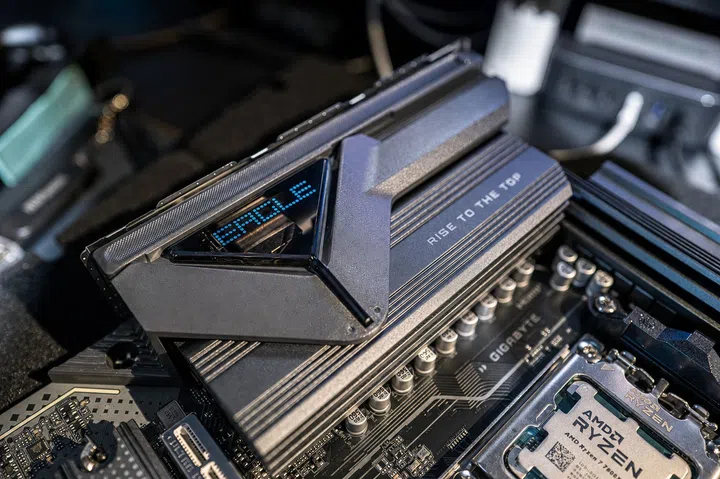
X870 Eagle WiFi7 heatsink

Gigabyte has smartly added additional armour over its heatsink to keep the X870 Eagle WiFi7 cool.

Photo: HWZ

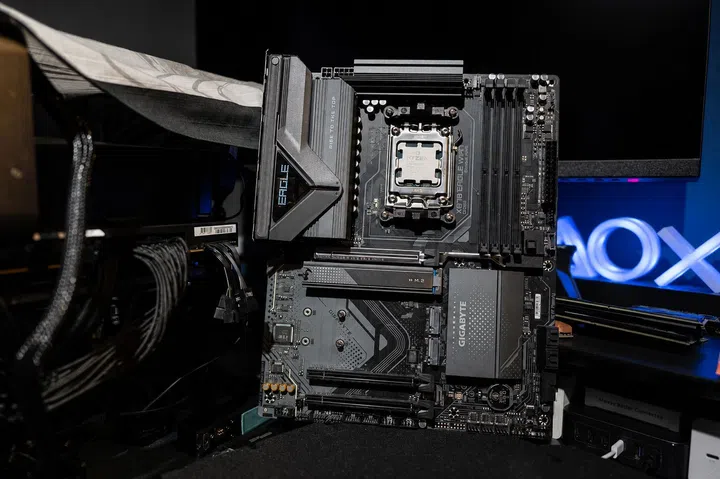
Its 14+2+2-phase digital twin power design, supported by Gigabyte’s VRM Thermal Armor Advanced cooling, is comfortably equipped to handle the 120W Ryzen 7 7800X3D. There is even enough headroom here for a more powerful AM5 processor should you decide to upgrade later, which is important because a motherboard should ideally survive at least one CPU upgrade before moving on to the eventual future platform.
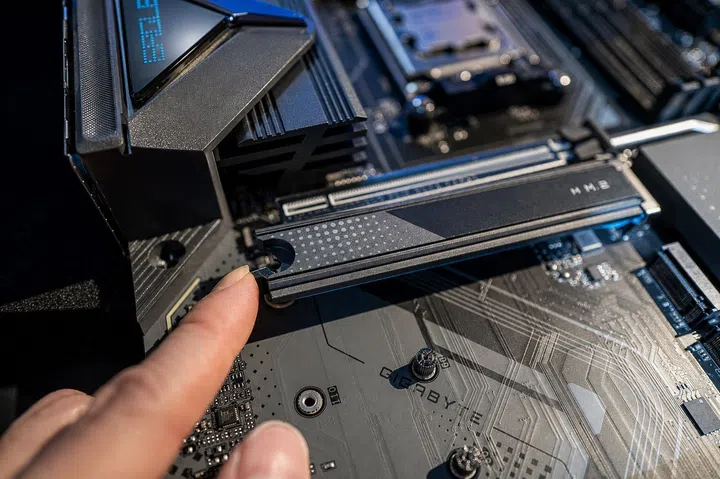
EZ-Latch

The EZ-Latch means you’ll never have to reach for a tool to install a SSD.

Photo: HWZ

The board has four DDR5 DIMM slots and supports the AMD EXPO memory profile. For storage, there are three M.2 slots, including one running on the faster PCIe 5.0 bus with the remaining two using PCIe 4.0. The EZ-Latch mechanisms on the M.2 and main PCIe slots are a small detail, but it means you’ll never have to install the SSDs with a tool.

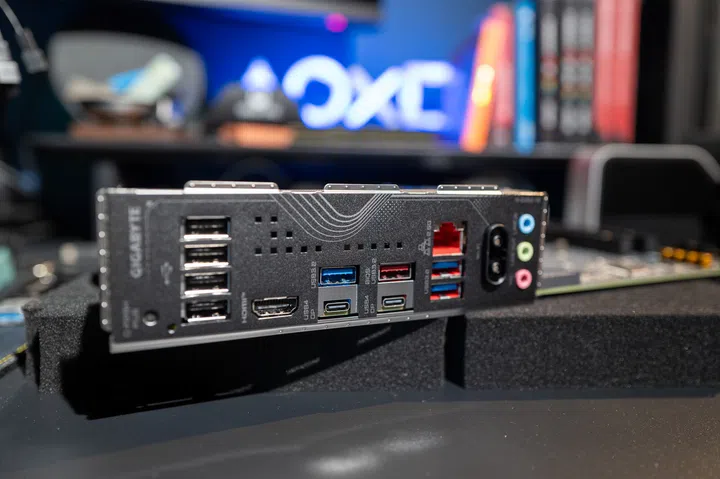
Gigabyte has also included Q-Flash Plus, allowing the BIOS to be updated without a processor, memory or graphics card installed. Connectivity is equally comprehensive, with Wi-Fi 7 and 2.5GbE LAN providing more than enough bandwidth for gaming and everyday use, while HDMI and two USB4 Type-C ports with DisplayPort Alt Mode support provide plenty of flexibility for displays and other peripherals.

The Ryzen 7 7800X3D is older but far from being obsolete
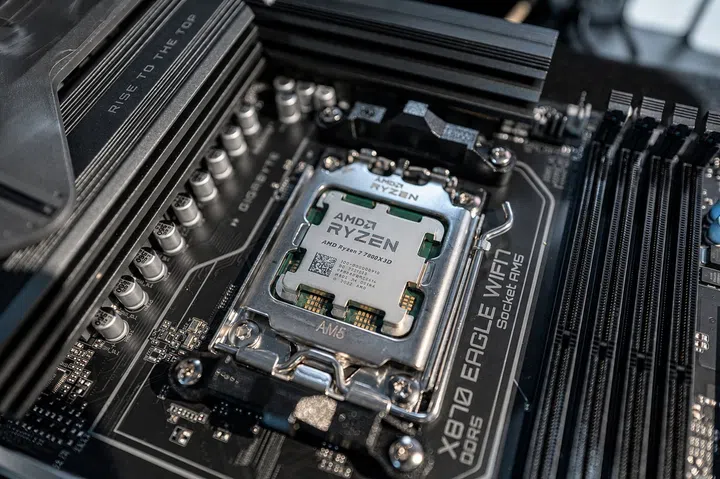
AMD Ryzen 7 7800X3D

The Ryzen 7 7800X3D is still an excellent choice for a gaming PC today.
Launched in 2023, the Ryzen 7 7800X3D combines eight Zen 4 cores and 16 threads with 96MB of L3 cache. That large cache comes from AMD’s 3D V-Cache technology (where the 3D V-Cache die sits on top of the processor’s core complex die), which can reduce the amount of time games spend fetching data from slower system memory. The result is a processor that built its reputation around gaming rather than simply having the largest core count on the box.

The newer Ryzen 7 9800X3D, which is from the newer Zen 5 architecture, is faster and the more obvious choice for someone pairing a flagship graphics card with a 1080p monitor running at a 240Hz or faster refresh rate. At those very high frame rates, differences between processors become easier to expose because the GPU is less likely to be the limiting factor.

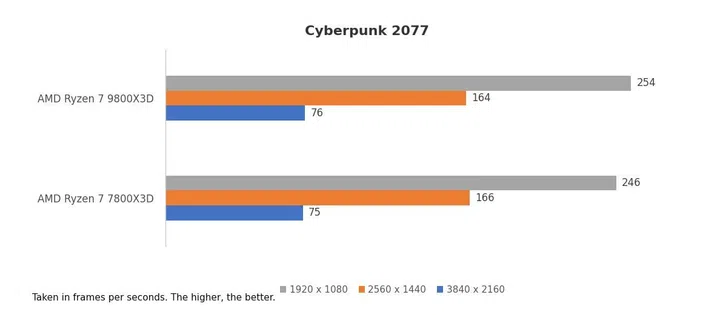
Cyberpunk 2077

In Cyberpunk 2077 and running with an NVIDIA GeForce RTX 5090 Founders Edition, for example, the Ryzen 7 7800X3D performs on par with the Ryzen 7 9800X3D.

Image: HWZ

Move to 1440p and turn up the visual settings, however, and the table is turned. The GPU plays a more important role, particularly in demanding AAA games. Paying substantially more for the CPU may still produce a higher benchmark result, but that improvement will not necessarily be as obvious during gaming if the graphics card is already working at its limit.

That is really the point of choosing the Ryzen 7 7800X3D. It isn’t meant to beat every newer processor on a chart. It only needs to provide enough performance for a sensibly matched graphics card to do its job, and for most mainstream 1080p and 1440p PC builds, it remains comfortably capable. Competitive games can run at high frame rates, while more visually demanding titles are more likely to benefit from putting the saved money into a faster GPU.

In fact, a cursory look at our weekly Sim Lim Square PC component price list compilation shows S$175 in savings when choosing the Ryzen 7 7800X3D instead of a Ryzen 7 9800X3D, while paired with the Gigabyte X870 Eagle WiFi7 motherboard.

X870 Eagle WiFi7 ports

The X870 Eagle WiFi7 has plenty of connectivity for everyday use and gaming.

Photo: HWZ

The CPU price is only one part of the equation

PC component comparisons tend to focus on the difference between two CPU prices, but the actual cost of choosing a processor can extend beyond the chip itself. There is also the cooler to consider, along with the effect the entire system has on power and case airflow requirements that would scale according to higher-tier components used.

The Ryzen 7 7800X3D still requires proper cooling, especially in our sunny island’s warmer conditions. A sensibly chosen AIO cooler – or a capable tower cooler in a well-ventilated case – can keep the build’s temperature manageable without allowing cooling costs to bust your budget. The graphics card will generally have a much larger influence on PSU’s wattage than the processor, so there is little reason to buy excessive wattage simply for the sake of it. A better approach is to choose a good-quality PSU with enough headroom for the GPU you’re using and any realistic future upgrades, while if you’re on the lookout to save money, you can also save more by choosing a PSU matching the power requirements of your current rig.

9800X3D vs 7800X3D

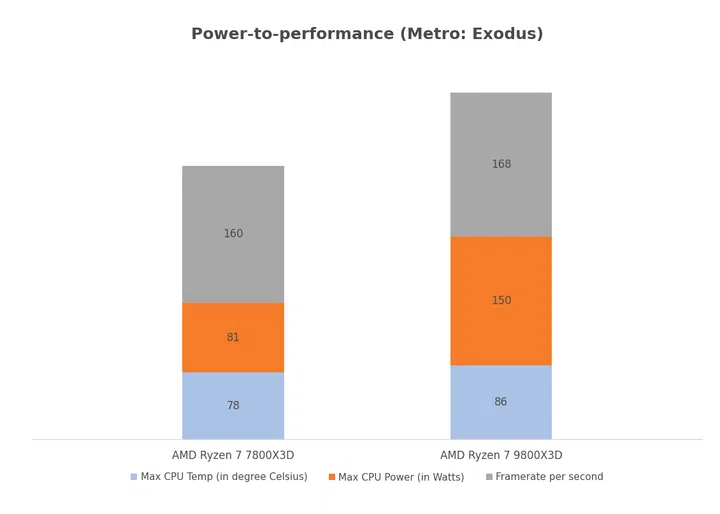
The Ryzen 7 7800X3D runs cooler and consumes considerably less power than the 9800X3D, yet trails it by just 5% in Metro: Exodus (at 1,920 x 1,080 pixels resolution).

Image: HWZ

Once you consider the whole build, the appeal of the Ryzen 7 7800X3D becomes more relevant. The money not spent chasing the newest CPU could pay for a stronger graphics card, a larger SSD or a better monitor. Any one of those may have a greater effect on the gaming experience than a processor upgrade that may look good in benchmark numbers but has very little practical impact in games.

You still have an upgrade path

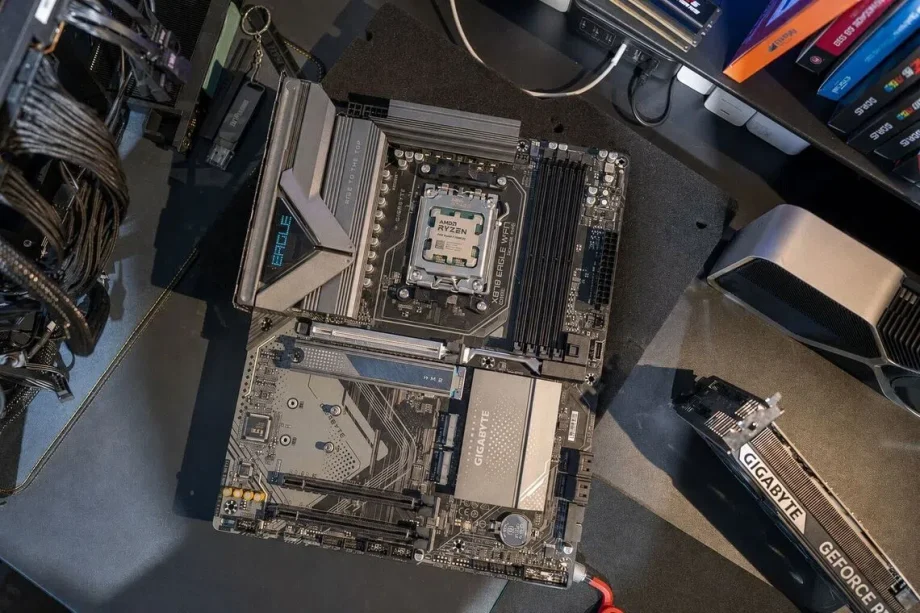
AM5 socket support

The AM5 socket used in the Gigabyte X870 EAgle WiFi7 is heavily future-proofed because AMD officially supports the platform through 2029.

Photo: HWZ

Starting with the Ryzen 7 7800X3D does not close off future options. The X870 Eagle WiFi7 officially supports AMD Ryzen 7000, 8000 and 9000-series processors, giving the system a broad selection of AM5 chips to move to later. Depending on the processor, that upgrade may require little more than installing the latest BIOS and swapping the CPU. Choosing this staged approach makes more sense than going all-in at the start and compromising everything else to stay within budget. Build the PC around the Ryzen 7 7800X3D now, put more of the money into the graphics card, and reconsider the processor when a future upgrade offers a difference that is actually worth paying for.

The Ryzen 7 7800X3D is also a widely recognised gaming chip, which should make it easier to find a buyer if you eventually sell it. Resale prices can never be guaranteed, but a popular eight-core X3D processor is likely to attract more interest in HardwareZone’s Buy/Sell forum (or other platforms like Carousell).

Taken together, the Gigabyte X870 Eagle WiFi7 and Ryzen 7 7800X3D are not about building the fastest PC at any cost. Rather, both are about building a fast gaming PC without spending money simply because more expensive options exist. For many 1440p – and even 4K – gamers, that is more than enough.

For more information on the Gigabyte X870 Eagle WiFi7, visit the Gigabyte website. If you’re ready to shop for one, get it here at Gigabyte’s Shopee page.

(In collaboration with Gigabyte.)

Our articles may contain affiliate links. If you buy through these links, we may earn a small commission.


Read Full Article At Source

Share. Save. Don't Miss The Buzz: XFacebookRedditLINETelegramWhatsAppGmail

Leave a Reply