At noon on 10 May, every smartphone connected to the Singtel network in Singapore will sound a 10-second alarm. But, don’t worry, it’s not a glitch. It’s Singapore’s new emergency alert system getting tested for the first time.
If you’re on Singtel (or any of the MVNOs that use its network like Gomo, VIVIFI, Zero1, or Zym Mobile), expect your phone to light up with a pop-up notification headed “SG Alert” at exactly 12pm this Sunday. The alert will come with a unique tone and a distinct vibration pattern lasting up to 10 seconds, and it’ll bypass silent mode and “do not disturb” settings to make sure you can’t miss it.
This is the first island wide test of SG Alert, the Singapore Civil Defence Force’s (SCDF’s) new mass emergency notification system. Singapore announced the launch in April after roughly two years of research and development, and Sunday’s test marks the start of a phased rollout that will eventually cover every mobile network in the country, with and expected rollout over StarHub’s network by end-2026, followed by M1’s and SIMBA’s network by mid-2027.
Singapore already has air-raid sirens, TV and radio broadcasts, and apps like SGSecure. SG Alert is designed for emergencies like major fires, chemical incidents, or terror attacks, where authorities need to push protective instructions to people fast.
The technology behind it is called cell broadcast. Unlike SMS, which can choke during network congestion, cell broadcast pushes messages to many devices at once without needing mobile data or collecting personal information. There’s no app to install. Similar systems already run in Thailand, Japan, South Korea, and the US.
More information can be found at the SCDF’s Facebook page.
What the alert will actually look like
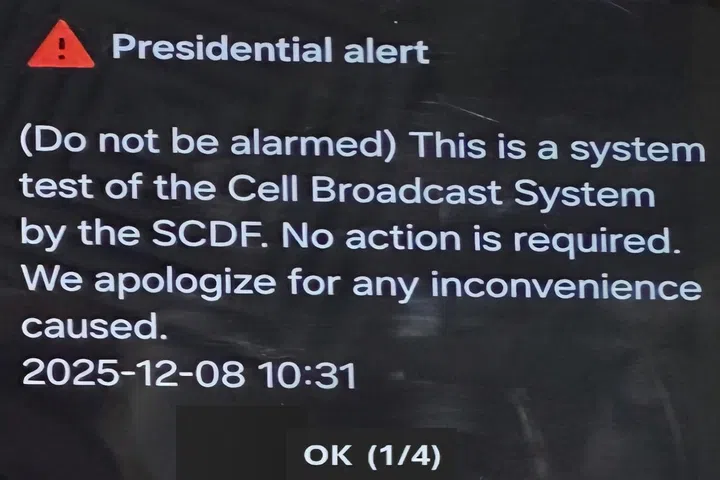
You could get a message looking like this. But it all ok.
Photo: SCDF
The message format is consistent. Every SG Alert will carry four pieces of information:
- The affected location(s)
- Protective actions to take
- Official sources and links for more details
- A brief description of the incident
For older phones, the header may show up as “Presidential alert” instead of “SG Alert” because of compatibility issues. The content stays identical, and SCDF says it’s working to standardise the header.
FAQ: What you actually need to know
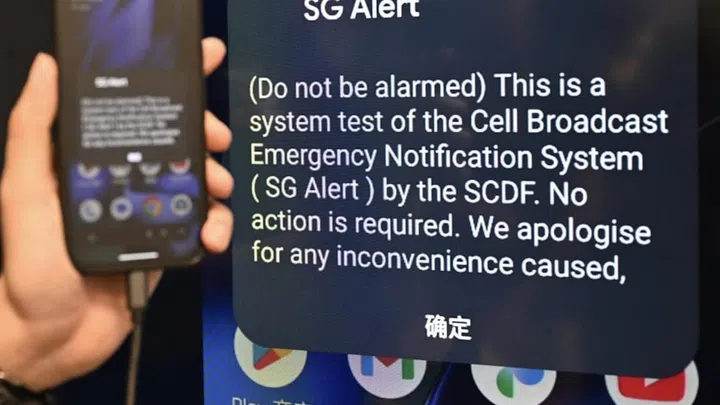
What the SG Alert message should look like