Samsung finally redesigned the SmartThings app to keep up with its 470 million users

Samsung finally redesigned the SmartThings app to keep up with its 470 million users


Samsung has finally gotten around to giving the SmartThings app a facelift. 

In its latest interface update to its self-made smart home control app, Samsung acknowledged it has a massive user base — 470 million registered, by its count — and a long list of 430+ compatible brands that work with the app. 

The hero change is SmartThings Now, which is an even more powerful version of Home Insight. Other additions include an updated Home tab, extra service cards, and a Floating Bar for frequently used features, plus local control technology to make reconnecting to disrupted home Internet more seamless.

We dive into each updated element below.

SmartThings Now

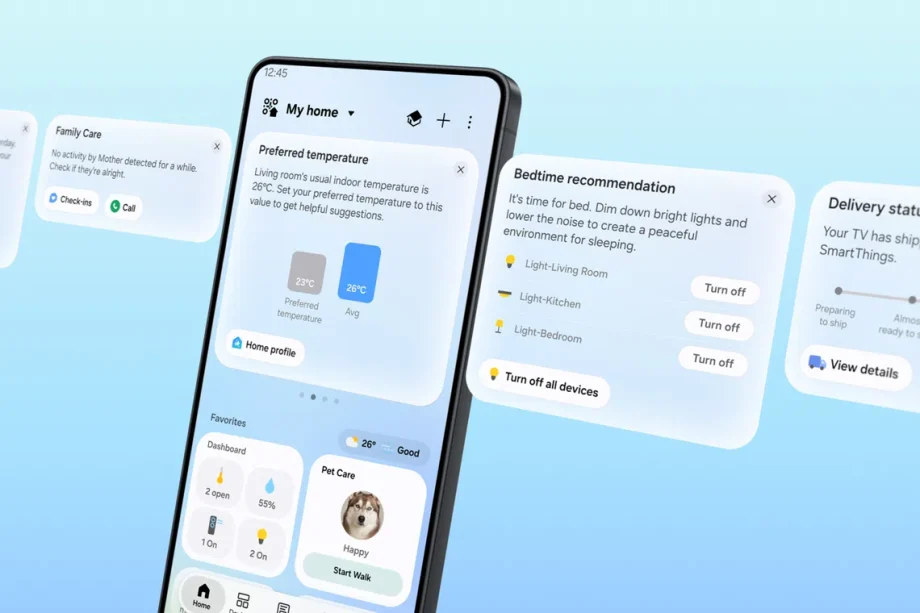
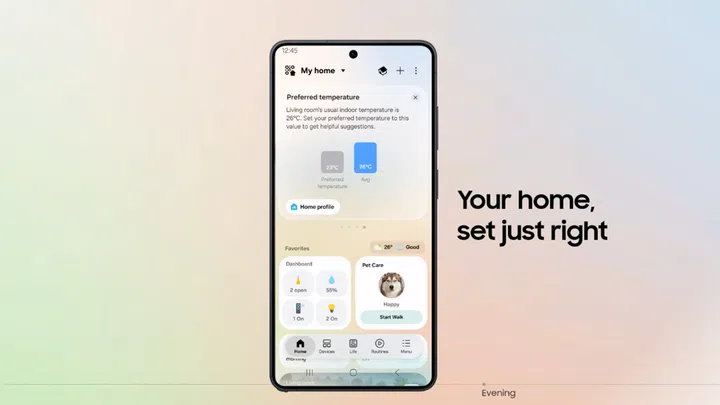
SmartThings Now is a set of cards at the top of the revamped Home tab, replacing Home Insight.
Samsung’s updated SmartThings app

Image: Samsung

The cards only appear when there’s something to do, and only at relevant times. Samsung gave the example of a card appearing if a registered Family Care member shows no activity for an unusually long period of time, letting the user know it’s probably worth checking in with them. Another example is that cards also appear when it detects you’re coming near your home, and it will ask whether you want registered appliances to turn on before you step in (like air purifiers and smart lights).

The cards can also suggest whether you need to programme a routine based on your usage patterns. For example, it can even suggest deleting cards or previously programmed routines that are not used frequently, while also suggesting new routines based on how your use your devices and appliances.

If you’re familiar with the app, you’ll know its primary page was a 3D map of your home, provided you bothered to create the map and manually label every appliance in it.

Home tab updates and Floating Bar

All this builds on streamlining the Home tab to make browsing more intuitive, now organised around three key functions: dashboards, device cards, and service cards. The reorganisation makes better use of limited real estate, showing more functions on a single screen with numerical readings.

It also adds a Floating Bar that houses frequently used settings and features at the bottom of the screen. This not only fleshes out all your most-used settings but also puts them closer to your thumb, making one-handed control possible even on larger phones.

Local control technology with a SmartThings Hub

A bugbear of ad-hoc smart home appliances is that many require you to manually reconnect whenever you change your home Wi-Fi settings, or when a scheduled restart or sudden outage interrupts the connection. Sometimes, it’s not even consistent: you can go months without having to set everything up again, while still randomly ‘losing’ connected devices.

If you own a separate SmartThings Hub device and connect it to the same Wi-Fi network as your phone (with SmartThings app on it), the mobile device communicates directly to the hub instead of the cloud. This improves response times (Samsung says it’s up to 30% faster) while maintaining control even during network fluctuations or disruptions.

Called Local Control Technology, this add-on also intelligently switches between local and cloud-based controls by detecting whether the user (and their mobile device) is at home, or away. 

Perhaps the most critical is the changes to the Offline Device Diagnostics page, which now helps users restore any dropped devices that have gone offline, since it updates network information to all registered devices at once.

Also added is support for Matter 1.6, which in turn supports new features such as real-time energy and power monitoring for energy meters, closing specialised doors and gates, controlling irrigation systems (e.g., sprinklers), and soil sensors to measure ground conditions (for high-tech gardening hobbyists).


Read Full Article At Source

Share. Save. Don't Miss The Buzz: XFacebookRedditLINETelegramWhatsAppGmail

Leave a Reply