Lenovo Yoga Slim 7i Ultra Aura Edition Gen 11 review: Thin, light and surprisingly powerful

Lenovo Yoga Slim 7i Ultra Aura Edition Gen 11 review: Thin, light and surprisingly powerful


  1. 1. The Yoga story
  2. 2. Hands-on experience
  3. 3. Performance & benchmarks
  4. 4. 1080p gaming
  5. 5. Productivity and content creation
  6. 6. Battery life and power efficiency
  7. 7. Final thoughts

The Yoga story

I have always felt that Lenovo’s Yoga line of laptops is one of the more confusing series to follow. In the beginning, the name was used for laptops that could fold its displays 360-degree – turning them into large Windows tablets. That is no longer the case these days. The Yoga range has since grown to include Pro laptops with a focus on power, Slim for its ultraportable models and the 2-in-1 for creators.

The way I see it, the Yoga Slim laptops are Lenovo’s answer to competitions such as the ASUS Zenbook and Dell XPS. They are less business-like than a ThinkPad, and Lenovo tend to place more emphasis on design, displays and portability here. The problem, if you can call it one, is that there are now so many variations that the names are becoming quite a mouthful. The laptop I’m reviewing here is officially called the Lenovo Yoga Slim 7i Ultra Aura Edition Gen 11, which is a lot of words for something designed around minimalism.

Still, the “Ultra” part of its name is not entirely without reason. This is a 14-inch laptop that weighs less than 1kg, packs a surprisingly large 75Wh battery and can be configured with Intel’s latest Core Ultra Series 3 processors. It is clearly going after the same group of users as the ASUS ExpertBook Ultra that I reviewed recently: people who want a proper Windows laptop without carrying something that feels like a proper Windows laptop. But although both arrive at almost the same weight, I feel Lenovo has taken a rather different route to get there.

Hands-on experience
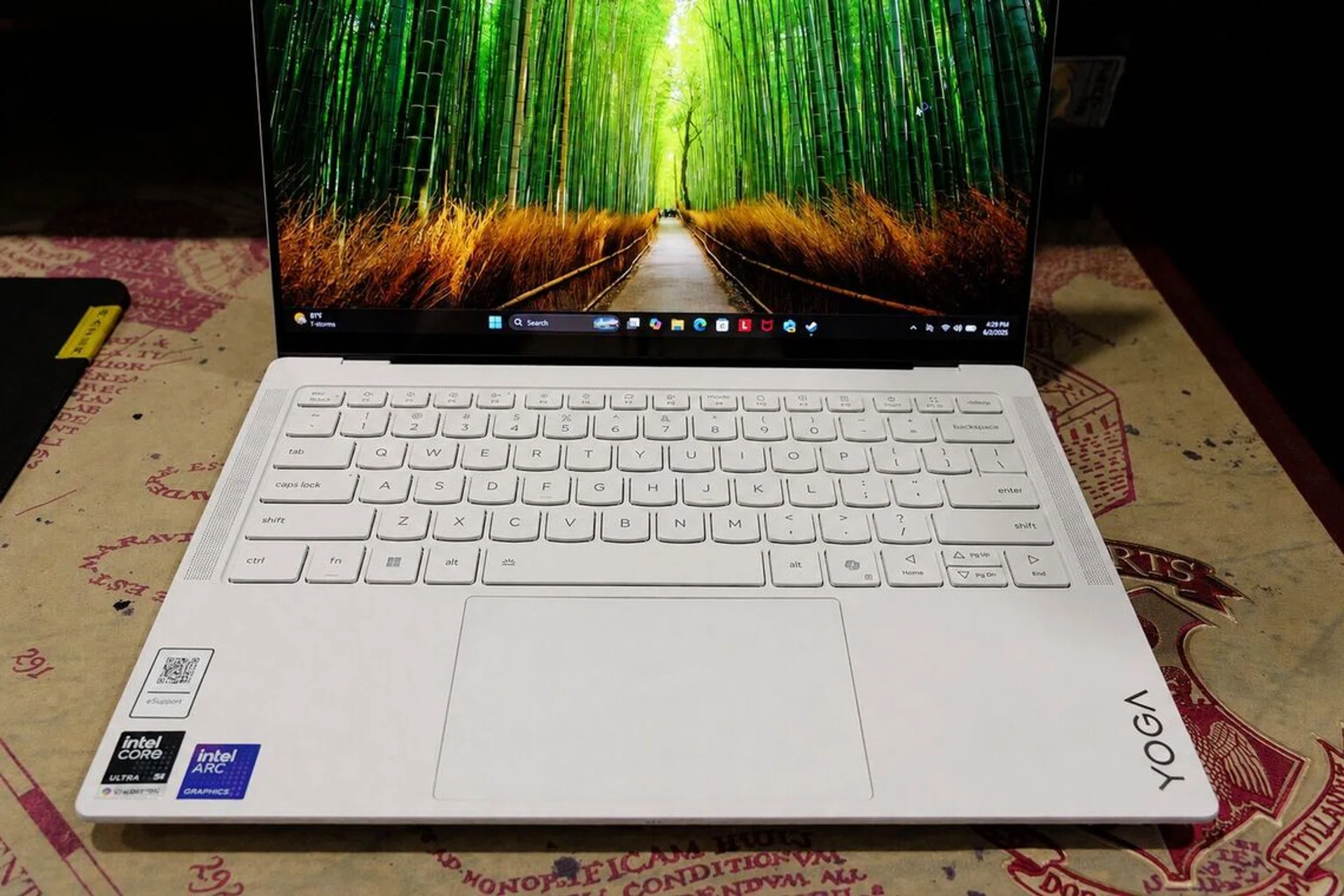
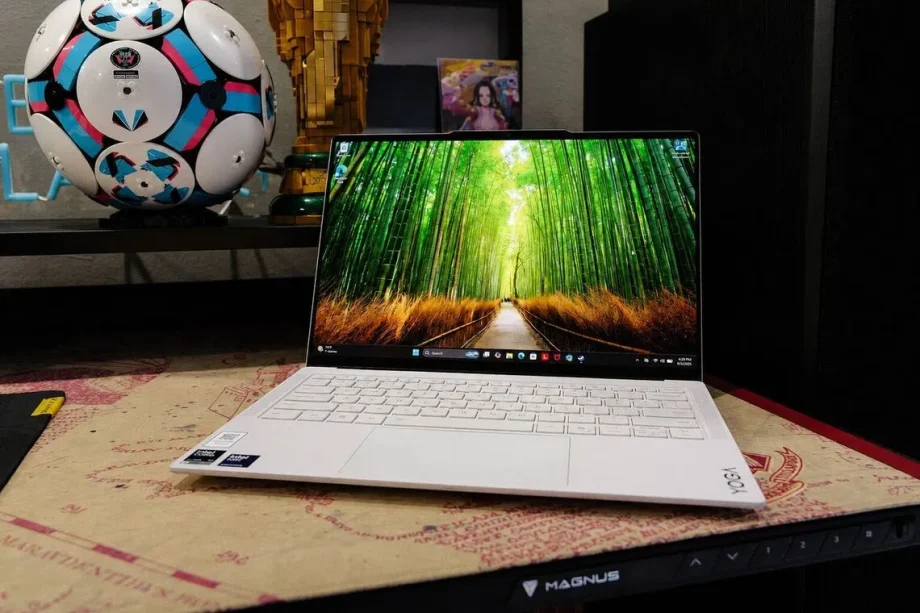
Ultraportable keyboard

The keyboard is possibly one of the best for an ultraportable laptop.

Photo: HWZ

The first thing I noticed when I picked up this Yoga was, unsurprisingly, how featherweight it felt on my hands. At 975g, it is technically lighter than the 0.99kg ExpertBook Ultra, although I would be lying if I said I could feel that 15g difference. Both are incredibly light, but the Yoga could give the illusion of being the lighter laptop thanks to its very thin and svelte chassis that measures at just 13.9mm.

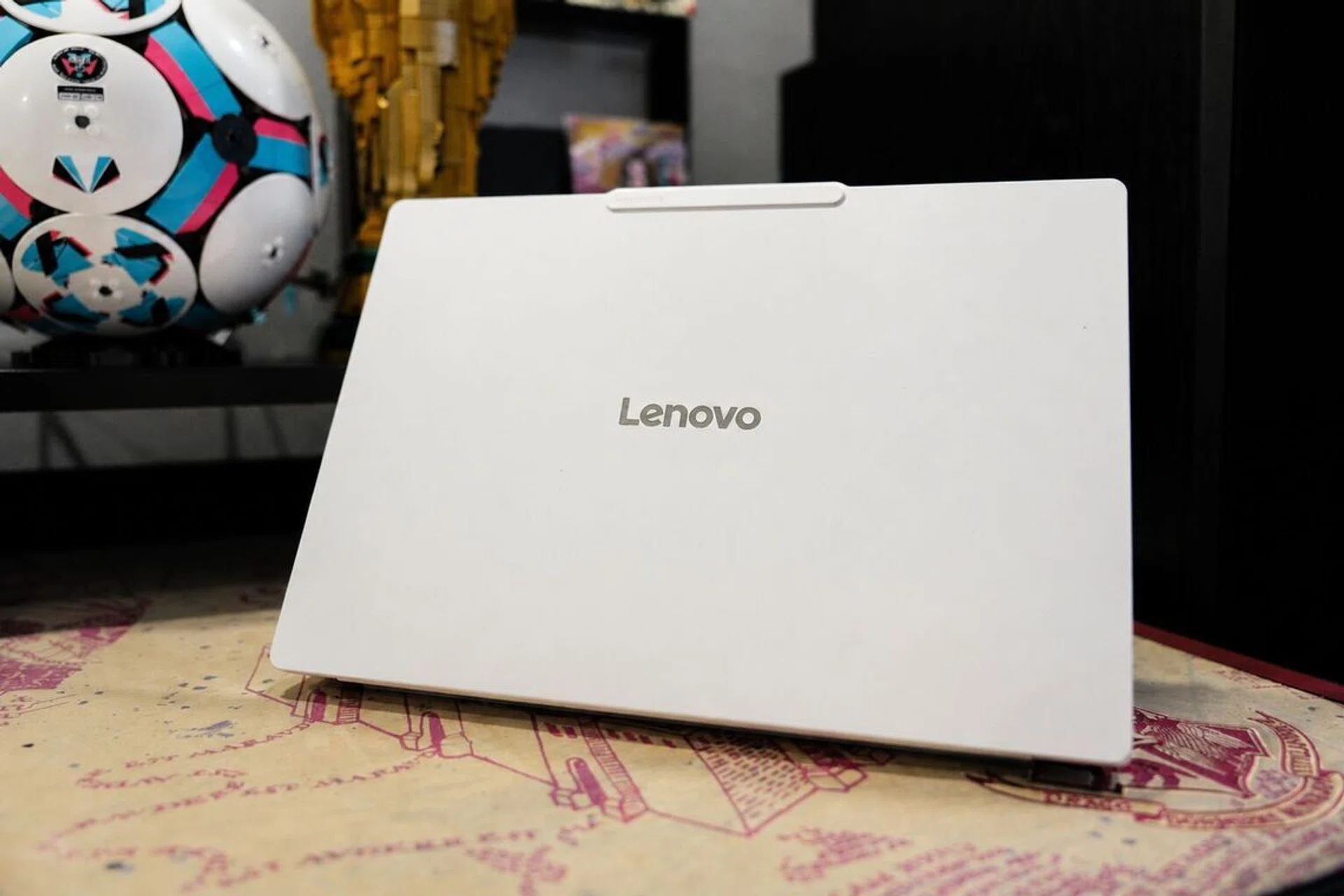
However, it’s what Lenovo has done with the laptop’s design that impressed me the most. For one, it doesn’t scream “expensive” and the magnesium-aluminium body feels solid despite the lack of weight, with no worrying amount of flex around the keyboard or lid. Its rounded edges also make it comfortable to rest my wrists on while typing. The overall appearance is restrained, perhaps almost too restrained depending on the colour you choose (white, or as Lenovo called it “Seashell”, is my preferred colour), but the small camera bump along the top of the lid gives it some character and, more practically, somewhere to grip when opening it.

That said, I felt that Yoga comes across more as a premium consumer laptop when compared with the ExpertBook Ultra – which was made for corporate road warriors. The ASUS machine has its tougher Nano Ceramic coating, spill-resistant keyboard and a chassis designed to survive maybe even a bomb explosion (don’t try it, but you get the picture). Lenovo says the Yoga Slim 7i Ultra has passed MIL-STD-810H military grade testing, but toughness is not really the vibe it gives off. If anything, the Yoga feels like a laptop I would want to look after; the ExpertBook feels like one that can look after itself.
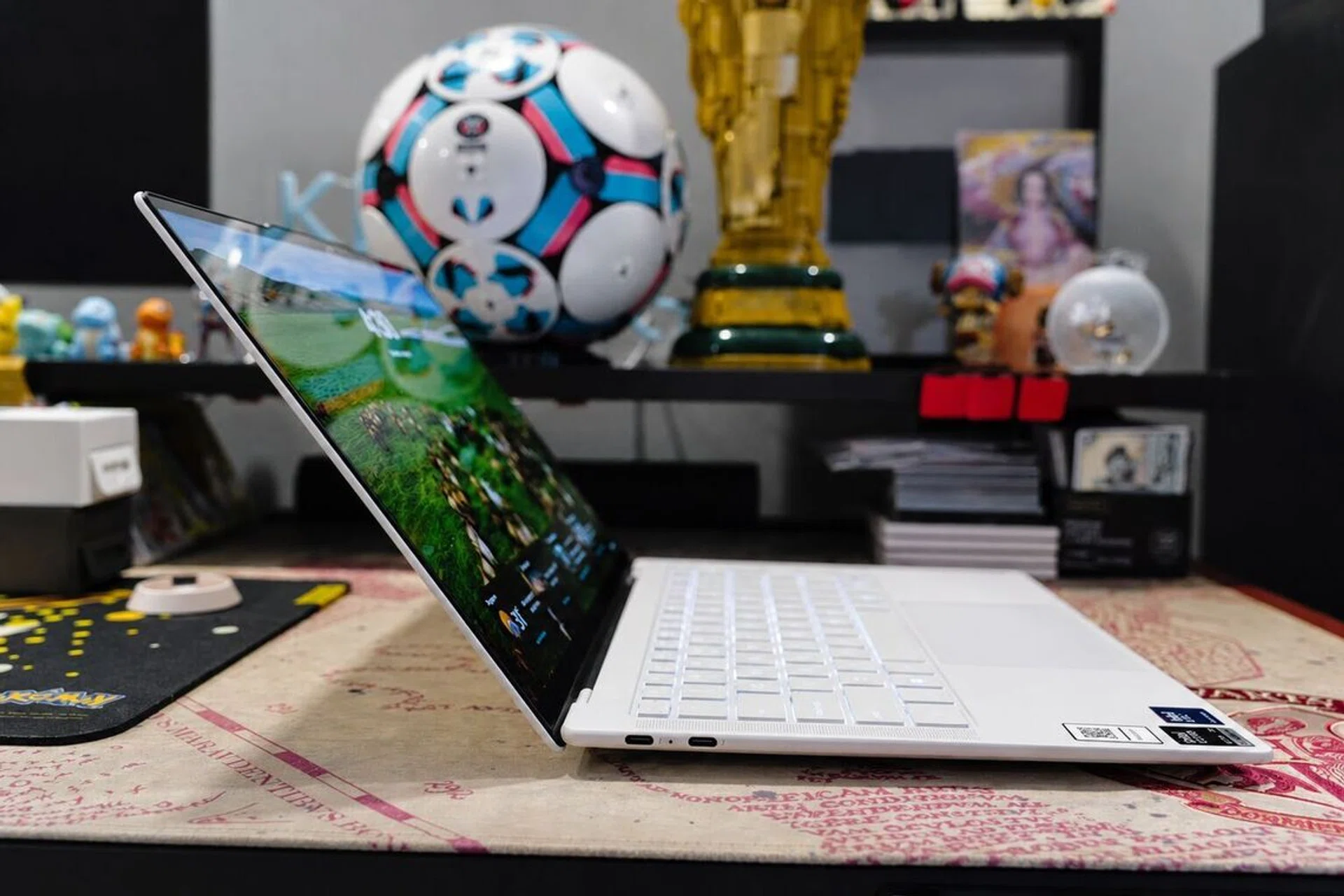
Not enough ports

With just 3 USB-C ports, the Yoga laptop is quite miserly with ports.

Photo: HWZ
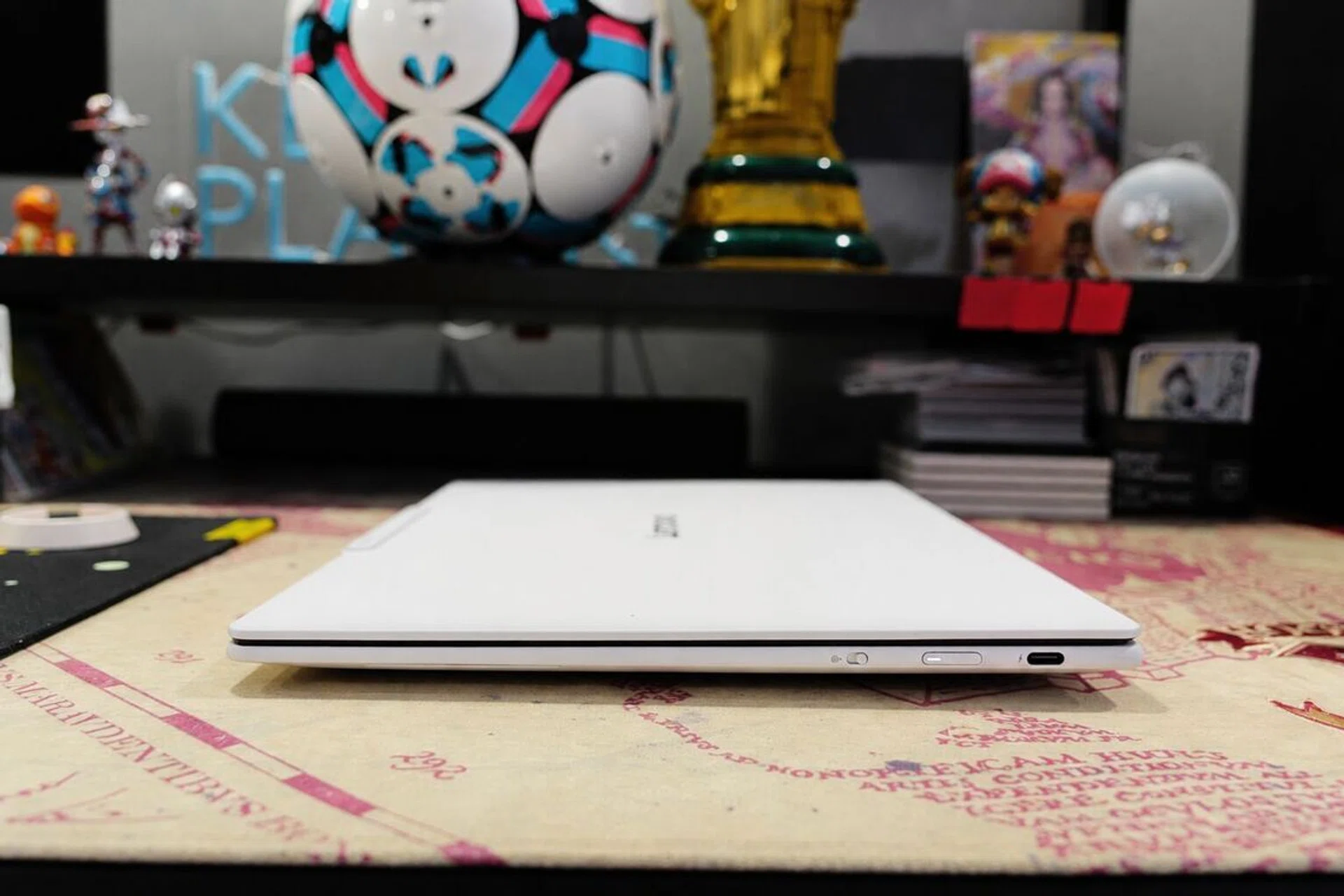
Laptop thickness

At just 13.9mm thick, the Yoga Slim 7i Ultra Aura Edition Gen 11 is just a hair thicker than the Apple MacBook Air.

Photo: HWZ

The display is easily my favourite part of the laptop. It is a 14-inch 2.8K OLED touchscreen with a 2,880×1,800-pixel resolution, a 16:10 aspect ratio and a refresh rate of up to 120Hz. Colours have the familiar richness that I would expect from OLED, blacks look properly dark and text remains crisp even when I have several windows squeezed onto the screen. Lenovo rates the panel at 500 nits for normal use and up to 1,100 nits with HDR content. I certainly found it bright enough indoors, and movies look very good on it, helped by Dolby Vision support and the four-speaker system. What I do not like, however, is the glossy finish. Reflections become quite obvious when I am using it beside a window or under bright office lighting. It’s certainly a compromise because while the Yoga’s display can look punchier when watching videos, I do wish for fewer reflections when using the laptop for office productivity

I also like the keyboard more than I thought I would. There is 1.5mm of key travel, which is pretty incredible for a laptop this thin, while the slightly dished keycaps give my fingers a natural place to land. More importantly, the keys have a comfortable amount of resistance and do not feel as shallow or brittle as some ultra-thin laptop keyboards. Lenovo has also applied a coating intended to resist oil and water, although the half-height up and down arrow keys still require some getting used to – for me anyway.

Camera bump

The small camera bump allows you to open the laptop’s lid easily.

Photo: HWZ

Connectivity is where the Yoga laptop disappoints me. It has only three Thunderbolt 4 ports, with no USB-A, HDMI, memory-card slot or even a 3.5mm headphone jack. I can understand trimming some connections to keep the laptop ultra-thin, but removing practically all of them feels excessive. Might Lenovo be able to fit a USB-A if they wanted to? I suspect their engineers could.

Ports aside, the bigger question here was what else Lenovo might have sacrificed to bring the Yoga below 14mm. A chassis this thin leaves very little room for cooling, after all, so I was curious to see how much performance Lenovo had managed to squeeze out of it – particularly against the similarly light ExpertBook Ultra and also the ASUS Zenbook Duo, since it uses the same Core Ultra X9 388H processor.

Performance & benchmarks

Specifications ASUS ExpertBook Ultra ASUS Zenbook Duo (2026) Lenovo Yoga Slim 7i Ultra Aura Edition Gen 11
Processor Intel Core Ultra X7 358H Intel Core Ultra X9 388H Intel Core Ultra X9 388H
Graphics Intel Arc B390 Intel Arc B390 Intel Arc B390
Display 14-inch 3K Tandem OLED touchscreen, 16:10, matte, Gorilla Glass Victus Dual 14-inch 3K OLED touchscreens, 16:10 14-inch 2.8K (2880 x 1800), OLED, Touch, 120Hz, Glass
Memory 32GB 32GB 32GB
Storage 2TB 1TB 1TB
Battery 70Wh 99Wh 75Wh
Weight 0.99kg 1.65kg 0.98g
Dimensions 310.9 x 212.8 x 10.9–16.4mm 310.1 x 208.6 x 19.6–23.4mm 312.6 x 213.8 x 13.9mm
Launch SRP (SGD) $5,399 (SKU not available in SG) $3,799 (reviewed)

Under the hood, the Lenovo Yoga Slim 7i Ultra Aura Edition Gen 11 is powered by Intel’s Core Ultra X9 388H, the same flagship processor I previously tested on the ZenBook Duo. That gives this laptop an interesting starting point because the chip itself is not an unknown quantity, but how it performs inside a sub-1kg chassis is another matter. Thin-and-light laptops often look very capable on paper, but the real test is whether they can sustain that performance without getting their power throttled thanks to an efficient heat dissipation – or the lack of it.

1080p gaming

1080p gaming

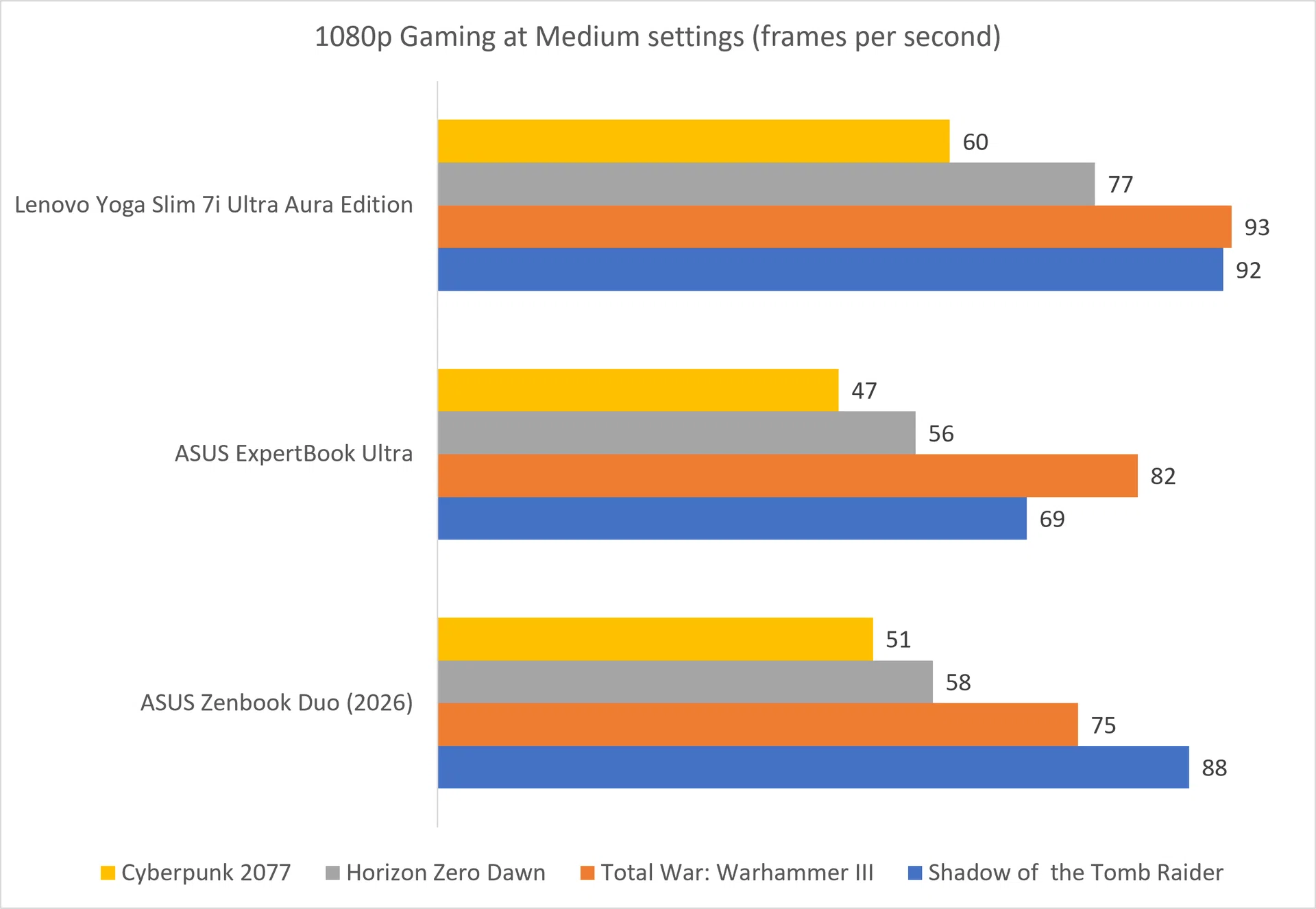
The higher the fps, the better.

Image: HWZ

Now, I was not expecting the Yoga Slim 7i Ultra to be the strongest gaming laptop of the three, particularly after spending so much time talking about how thin and light it is. Yet that is exactly what happened. It outperformed both the ExpertBook Ultra and Zenbook Duo across all four games

Its lead over the ExpertBook Ultra is not entirely surprising because the ASUS laptop uses a lower-tier Core Ultra X7 processor. What caught my attention however, was how the Yoga finished far ahead of the Zenbook Duo in Horizon Zero Dawn and Total War: Warhammer III, which has the same Core Ultra X9 processor. The difference seems to suggests that Lenovo has managed to extract more performance from the chip despite squeezing it into a much smaller, sub-1kg chassis. Cooling, power limits and Lenovo’s own system tuning may all have played a part here.

For a laptop primarily meant for writing, browsing and travelling light, the fact that it can also handle modern games this well on the side is a rather pleasant surprise.

Productivity and content creation

Productivity and content creation performance

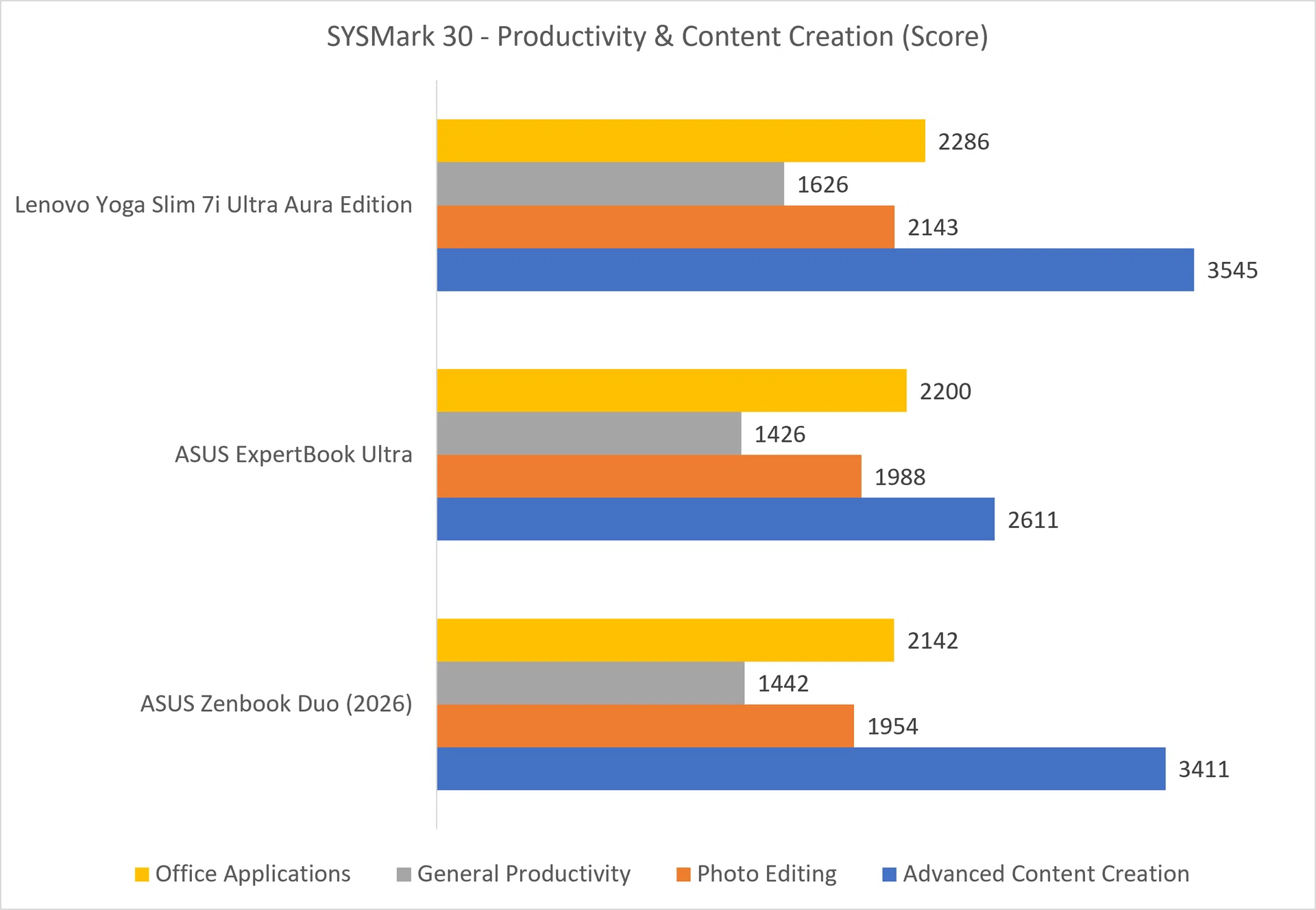
The higher the score, the better.

Image: HWZ

The SYSmark 30 results tell a similar story, although the Yoga’s advantage is not equally large across every workload. It finished ahead of both ASUS laptops in all four categories, but the difference in everyday office applications is relatively small. In reality, all three should feel equally responsive when working on documents, spreadsheets, presentations and the usual pile of browser tabs.

Advanced content creation produces a closer contest between the Yoga and Zenbook Duo, which is understandable given that both use the same Core Ultra X9 processor. Even so, the Yoga still edges ahead, and I think this mirrors the gaming benchmarks above: That the engineers at Lenovo have done a good job with its power and thermal tuning despite the laptop’s thin chassis. To be clear, the Yoga isn’t going to run like a dedicated workstation, but there is enough performance here for photo editing, lighter video work and other creative tasks. You don’t hear this very often, if at all, from older ultraportable laptops.

Battery life and power efficiency

MobileMark 30

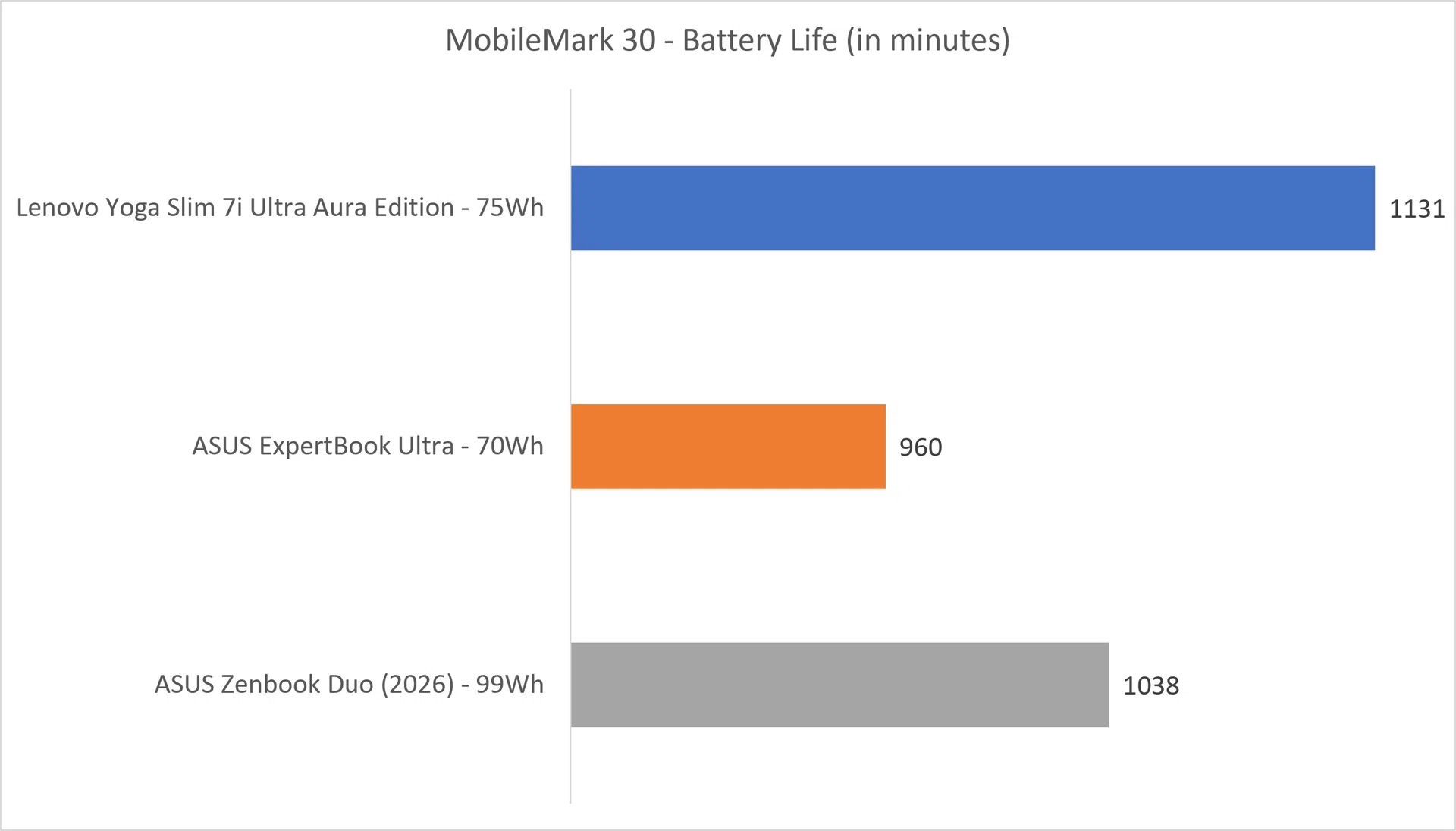
The higher the minutes, the better

Image: HWZ

Battery life is where the Yoga makes a very strong case for itself as a travel laptop. It lasted longer than both ASUS machines in MobileMark 30, including the Zenbook Duo despite the latter having a much larger 99Wh battery. The ExpertBook Ultra comes closer with its 70Wh pack, but the Lenovo still manages to pull ahead. That is quite an achievement for something this thin and light, and means I would feel comfortable leaving its charger behind when heading out for most of the day.

Power efficiency

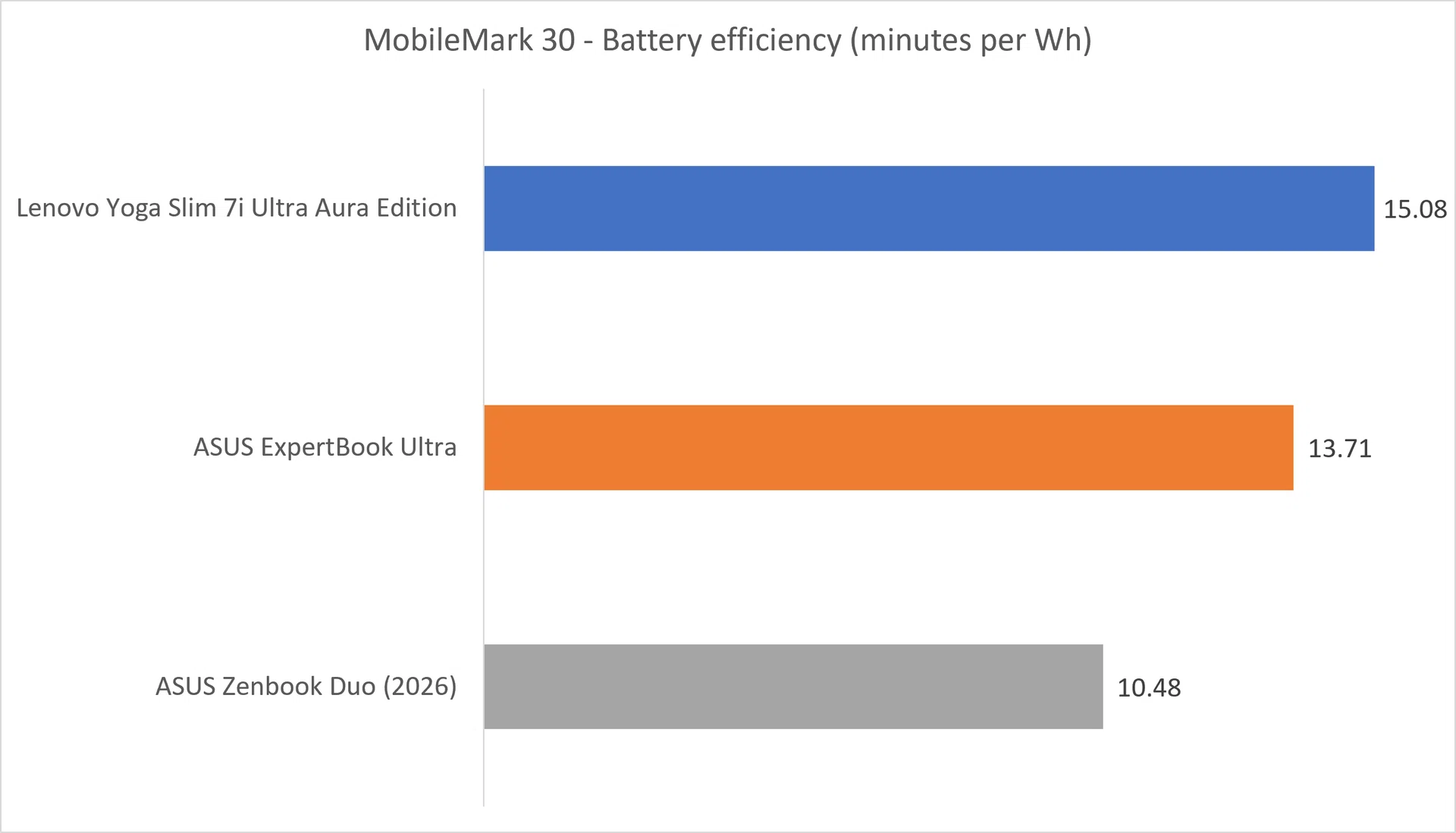
The higher the minutes per Wh, the better

Image: HWZ

For me, the power-efficiency results are even more convincing. Rather than simply squeezing in a large battery, the Yoga gets more runtime from every Wh than either ASUS laptop. The Zenbook Duo’s two displays understandably work against it here, but the Yoga also finishes ahead of the single-screen ExpertBook Ultra. Considering that the Lenovo laptop led the gaming, productivity and content-creation tests as well, the Yoga’s ability to deliver this level of battery efficiency without noticeably holding back performance may be its most meaningful achievement.

Final thoughts

Laptop colour options

A “Cosmic Blue” colour option is available, besides Seashell (aka white).

Photo: HWZ

After spending time with the Yoga Slim 7i Ultra Aura Edition Gen 11, I kept coming back to the same thought: it does not behave like a laptop that weighs just 975g. Older ultraportables often made their compromises obvious through throttled performance, limited battery life or even keyboards that are uncomfortable to type on. Here, Lenovo has managed to fit in a gorgeous OLED display, a genuinely good keyboard, strong performance and excellent battery life.

The difficult part is the price. The Yoga starts at $2,439, while the Core Ultra X9 configuration reviewed here costs $3,799. That is expensive for a laptop with integrated graphics and only three Thunderbolt 4 ports, although not totally unreasonable when compared to competitors’ equivalent. I think the $3,799 model is justifiable if you want the Core Ultra X9’s mobile flagship performance, but the base model should make more sense for most people.

Ultimately, if I had to choose a laptop for travelling, writing and getting work done and still enjoy the occasional gaming, then the Lenovo Yoga Slim 7i Ultra Aura Edition Gen 11 – regardless of models – sits right at the top of my shopping list. Lenovo may have given it a ridiculously long name, but the laptop is very easy to recommend.

The Lenovo Yoga Slim 7i Ultra Aura Edition is now available at Lenovo’s e-store, Challenger and Courts.


Read Full Article At Source

Share. Save. Don't Miss The Buzz: XFacebookRedditLINETelegramWhatsAppGmail

Leave a Reply