If you’re wondering who the target audience is for the Steam Machine, you’re looking right at him. Valve’s mini-PC was custom-built for my exact situation. I’m a lifelong console owner who has always preferred plug-and-play ease over fiddly optimization. A friend built my current PC rig for me in 2016, and I’ve been putting off upgrading it for years because I just don’t want to deal with the headache. I’ll happily compromise on resolution and framerate if it means comfortably playing a game curled up on my couch with a Nintendo Switch 2 rather than in my crappy office chair. There’s a lot of PC hassle I can live without, but I do hunger to play Steam games and exist in that ecosystem.
That’s where the Steam Machine comes in. Priced between $1,049 and $1,428 for the top-end model, Valve’s sales pitch is that the little black box can bridge the gap between PC and console owners, giving the latter a plug-and-play solution that’s as easy to use as a PlayStation 5. Based on the time I’ve spent living with the device so far, the Steam Machine delivers on its casual ambitions. It’s a major graduation from my Steam Deck, and it will keep me from upgrading my PC during a RAM apocalypse. But as someone who is still technically-minded enough to analyze a benchmark test, I can’t deny that the Steam Machine’s hefty price tag doesn’t make financial sense, any way you slice it. The value you’ll get out of it is inversely proportional to the amount you know about hardware.

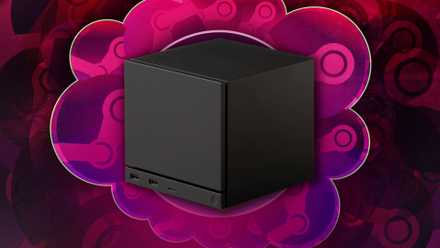
From a design standpoint, the Steam Machine is a perfect little creation. It’s one of the few modern gaming devices that can actually sit snugly next to my TV, whereas my Xbox Series X and PS5 are stuck flopping on their sides in my entertainment center. It’s an unobtrusive object, but its LED light strip and swappable magnetic faceplate give it enough character to liven up my TV space. It’s very portable too, easily fitting inside my usual travel backpack alongside its cables and my Steam Controller. It doesn’t have a handle, but close enough: Welcome back, GameCube!
It may sound silly to praise the cute factor of a PC, but it’s an important selling point for Valve. The Steam Machine’s value isn’t in powerhouse specs; it’s in lifestyle branding. Valve is quietly taking pages out of the Apple playbook as of late, creating an ecosystem built around matching products that have “Steam” right in the name. If you’re going to play PC games via Steam, why not pick up a handheld, console, controller, and VR device that all work with one another and look similar? You’re paying just as much for aesthetic coherence in your gaming setup as anything, just as you are when you buy a $100 black-and-white PS5 headset.
Everything about the Steam Machine starts to make sense when you view it through that casual consumer lens. For those who don’t care to know much about their tech, there’s an appeal to having consistent devices that don’t require you to read an instruction manual with each new gadget. That’s baked into the Steam Machine’s seamless setup process. All you have to do is plug it in, set some quick details like your time zone, and log into your Steam account. That’s it. In less time than it takes to set up a Nintendo Switch 2, you’re staring at your entire Steam library on a TV screen. The only stop sign you’ll hit is if you don’t already have a Steam account, as you’ll need to make one first. It feels like magic if you’ve never thought to plug your PC into a TV, and that probably describes more people than you’d expect.
If you own a Steam Deck, you already know how to navigate it all since the box is running a virtually identical version of SteamOS. That’s Valve’s secret weapon at present: a clean UI that puts your library, friends list, and Steam store all in one place. If you’ve yet to encounter SteamOS, you won’t have much trouble learning how to use it. It’s as easy to navigate as a PS5 or Xbox interface. Your home screen will show you a row of your most recently played games front and center, alongside widgets showing you news and updates on your games. Every menu is neatly organized, so you won’t be confused as to how to access your game library or find the Steam store.
There aren’t really new tricks to toy around with on the Steam Machine. You can still download custom start screens, listen to game soundtracks, set performance overlays, and mess around with system-level tech like framerate limiting. It just feels like logging into the website you use at home on a library computer and having it function just the same. I have never felt less friction when setting up a modern video game console, let alone a PC.
The ease of use extends to actually playing games. On day one, I downloaded a dozen random games from my Steam library and tried firing them up. They ranged from brand-new AAA games to a tiny indie my late friend made before SteamOS existed, which he never got to optimize for Steam Deck. Every game I launched worked with no issues, including some games that aren’t even officially out yet. That’s a night and day difference between my first experience with the Steam Deck, where half of my initial testing suite just wasn’t functional on the handheld at launch. Being able to launch Mina the Hollower without even questioning whether it would run at 60 frames per second out of the box is a selling point for a console player.

From that specific perspective, the Steam Machine impresses. Part of my test suite involved loading up games that I’ve been playing on my Steam Deck this year, where I’ve been getting a very compromised technical experience. Monster Hunter Stories 3: Twisted Reflection runs on Steam Deck, but only at a choppy framerate that’s tough to hang with. It runs at a clean 60 frames per second on the highest available setting on Steam Machine. The same was true for Lego Batman: Legacy of the Dark Knight. The default presets for Steam Machine can get you in the 100 fps range if you disable your frame limit. Compare that to the Steam Deck, where you’re dipping below 30 fps even on low settings.


Read Full Article At Source