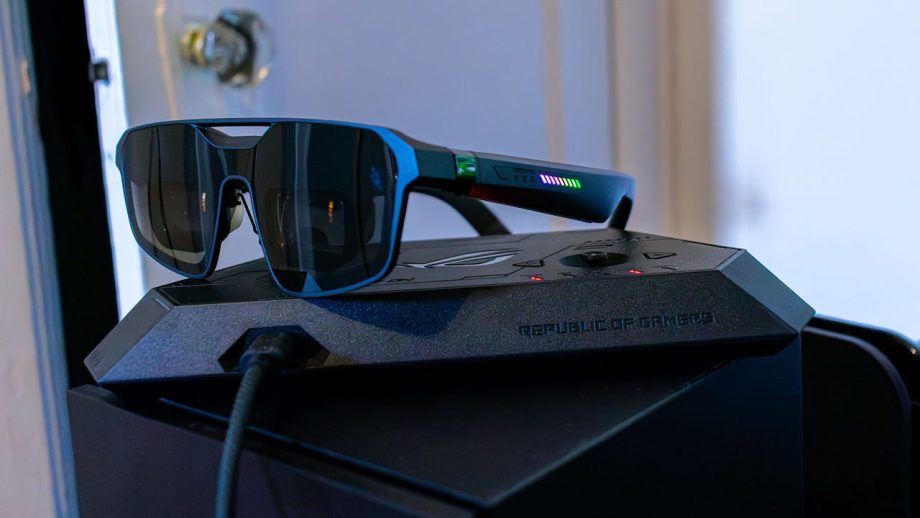
Sometimes it feels like XR glasses are the next frontier when it comes to gaming accessories. And it makes sense, with the rise of handheld gaming PCs – at least before RAM prices started making them nigh unaffordable – these glasses are a great way to get something like the Steam Deck a bigger screen while you’re away from home.
So, it makes sense that Asus would team up with XReal to make a bespoke pair of gaming glasses, especially off the back of the Asus ROG Xbox Ally X. And when the glasses are plugged straight into a handheld, the ROG XReal R1 is awesome, with a clear picture and some nice RGB lighting. But, these glasses cost $849, and at least part of that goes to the dock, which allows you to connect multiple devices through HDMI and DisplayPort. That’s a cool concept, but it ends up being the worst part of the entire package.
Design and Features
Out of all the XR gaming glasses I’ve tried so far, none of them look especially good. Just due to the fact that there needs to be displays, mirrors and whatever else built into the glasses themselves, the format lends itself to bulky, garish designs. The ROG XReal R1s are no different.
The little hood that houses the displays measures about an inch thick, which naturally makes the glasses protrude a bit from your face. The outward-facing lenses, then, have this angular design that does look a bit more attractive than something like the Viture Beast, but not by much.
The ROG XReal R1 does hide the little camera that powers head tracking a bit better than most of its contemporaries, though. The entire front of the glasses is one piece of dark plastic, with a small section kind of boxed off in the center. The 3DoF sensor lies in that little boxed off section, and if I didn’t know that these kinds of glasses need a camera sensor to function, I wouldn’t have even guessed that it was there.
There are plenty of these kinds of glasses out there that try to at least maintain an air of professionalism. The Viture Beast, for example, prides itself as being great for productivity. But the temples of the ROG XReal R1 are about as ROG as you can get. In the middle of each temple are nine RGB lighting zones, arranged in little diagonal lines. By default they have the standard cycling rainbow effect we’ve all seen a million times, but you can change the lighting by messing with the settings.
Most of the time, you’ll do that through the buttons found on the left temple. On the bottom, you have a button that either centers the screen in your field of view, or opens the settings if you double tap it. Behind that button is what you’d expect to just be a volume rocker, but instead pressing it in either direction will bring up a little menu with which you can adjust things like tint, screen size, and, well, the volume.

Read Full Article At Source