ASUS ProArt PX13 GoPro Edition review: It’s not really about GoPro

ASUS ProArt PX13 GoPro Edition review: It’s not really about GoPro


  1. 1. First impressions
  2. 2. Design
  3. 3. Performance
  4. 4. Final thoughts

First impressions

MIL-STD-810H standard

The ProArt GoPro Edition also meets the MIL-STD-810H standard.

Photo: HWZ

I wasn’t entirely sure what to make of the ProArt GoPro Edition (PX13) when ASUS sent it over. It wasn’t because of the hardware, which is pretty straightforward, but more because of the collaboration between ASUS and GoPro. When you think of GoPro, you think of something rugged like the company’s action cameras. This ProArt isn’t that, at least not in the literal sense. It’s still a laptop at the end of the day, and not one you’d casually drop or knock around. But after a few days of using it, I realised I wasn’t really interacting with it any differently from a regular ProArt machine.

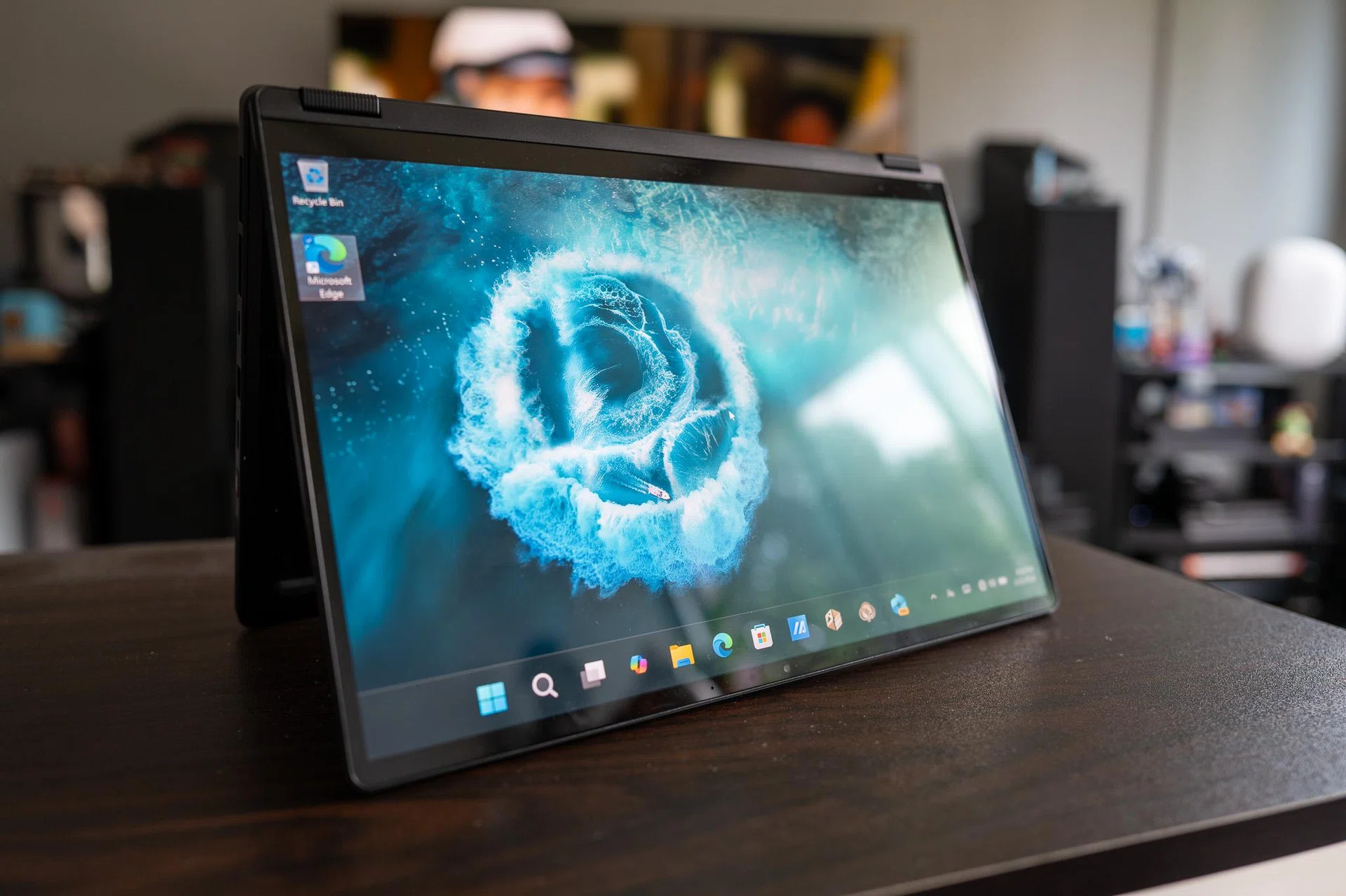
And I think that’s where it started to feel a bit more interesting. Because the more I used the laptop, the less the GoPro part mattered, and the more the laptop itself stood out. Somewhere between flipping it into tent mode to skim through clips while Spotify plays in the background and just leaving Lightroom open with a bunch of Chrome tabs running at the same time, it stopped feeling like a small 13-inch ultraportable altogether. It just felt like a really capable creator laptop that happened to have a GoPro badge on it.

Design
The GoPro Edition bits are there, but you have to actually look for them. A bit of cyan here and there, some small accents, and that’s about it. It never feels like ASUS is trying to shout about the collaboration, which I think is the right call. At the same time though, I did keep coming back to the same question after a few days – what exactly is the GoPro connection here beyond the branding?

To be fair, there is some level of software integration here. The PX13 comes with a dedicated GoPro hotkey that launches GoPro Player, along with integration into ASUS’ StoryCube app that ties into GoPro Cloud. In theory, that means your footage can sync automatically, get sorted and tagged, and be ready for editing without the usual manual steps of importing and organising files. There’s also support for 360-degree video playback, which makes more sense if you’re already working within the GoPro ecosystem.
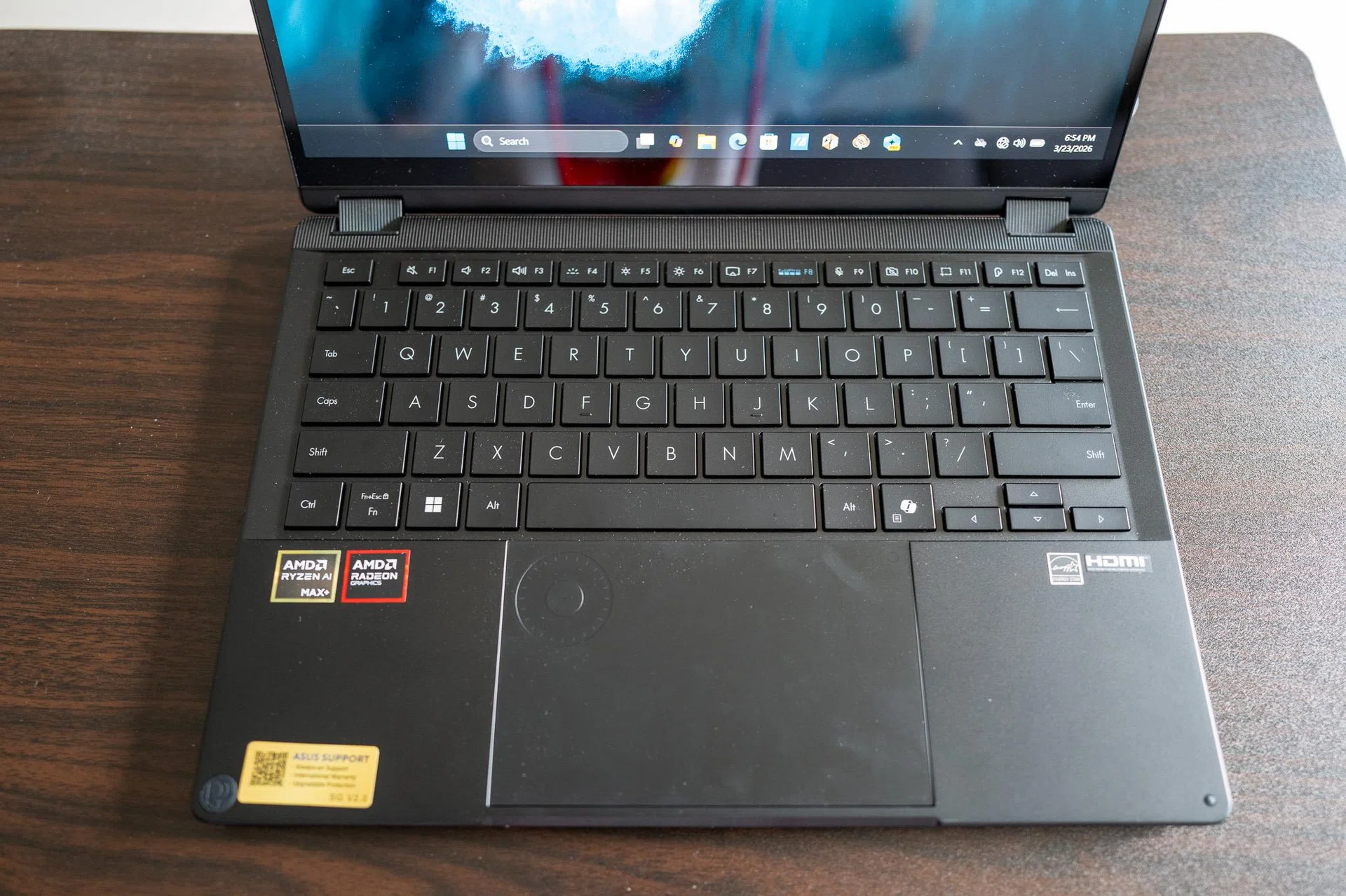
GoPro hotkey

There’s a dedicated GoPro hotkey that launches the GoPro Player.

Photo: HWZ

The thing is, while it sounds useful on paper, it doesn’t really change how you use the laptop unless you’re heavily invested in GoPro’s ecosystem. If you’re just editing footage the usual way, it’s fairly easy to ignore and carry on as you normally would.

Because it’s not like this is built specifically around GoPro hardware – there’s no mounts, no accessories, nothing here that really ties it directly to GoPro cameras. And it’s definitely not rugged in the sense that you’d treat it like outdoor gear either, even if the PX13 meets the MIL-STD-810H standard. If anything, the connection feels more like a shared way of using it. Something you can bring along on a shoot, set up quickly wherever you are, and just get your edits done on the spot.
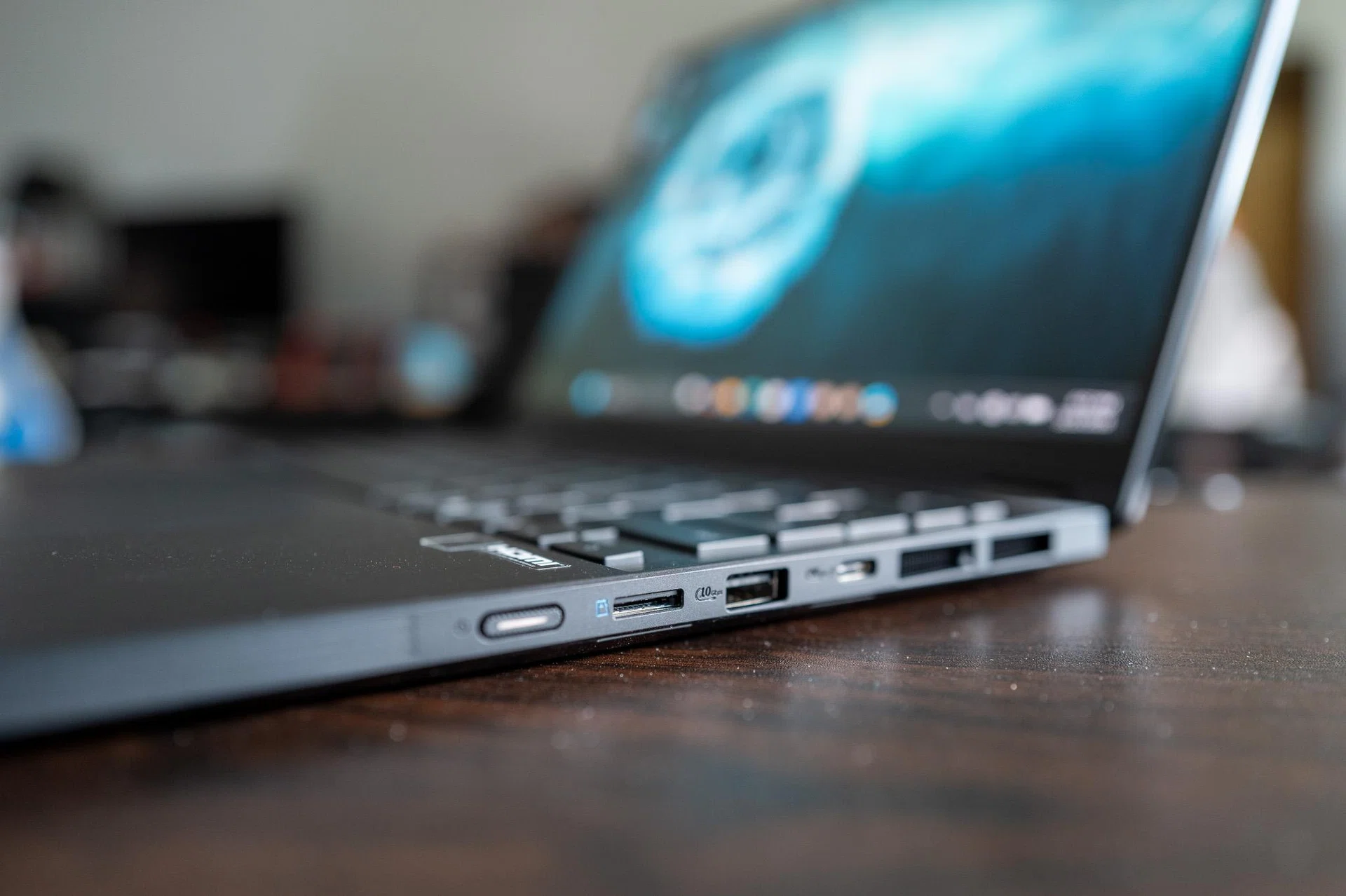
PX13 right side

The PX13 comes with plenty of ports, not something you can say for many ultraportable laptops.

PX13 left side

When closed, the PX13’s thickest part measures at 1.77cm.

Photo: HWZ

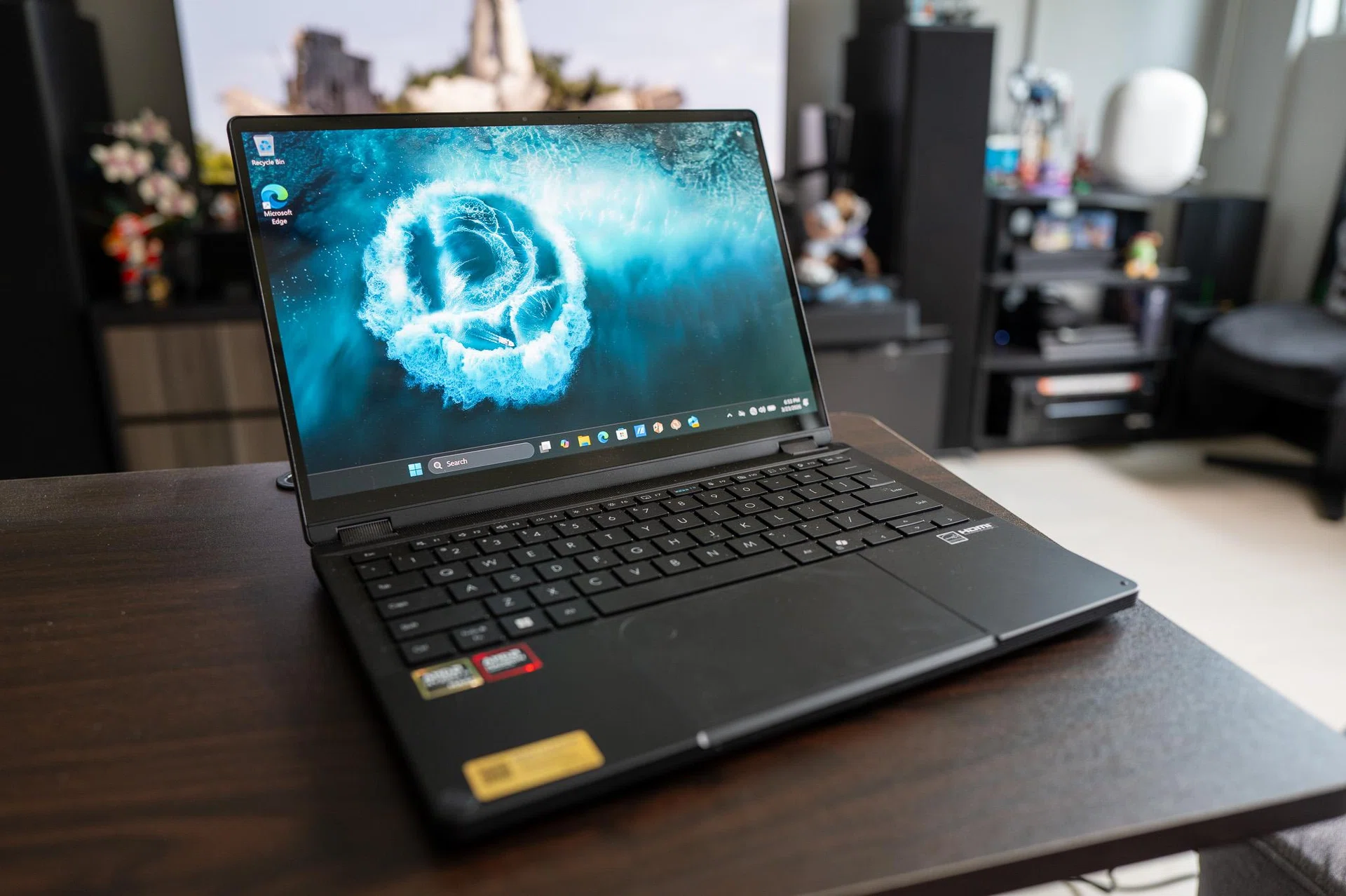
When you look at it that way, it almost feels less like ASUS worked with GoPro to build this, and more like ASUS built a laptop that just happens to fit that same “go pro” mindset. I’m really impressed by how solid the PX13 feels. There’s a bit of heft to it, despite its diminutive size (29.82 x 20.99 x 1.77cm) when you pick it up, not in a heavy way even at 1.39kg, but in how tightly everything feels put together compared to most 13-inch machines. This is an ultraportable that’s not afraid to be handled roughly.

As with all ASUS high-tier laptops, the PX13 sports a great-looking OLED display too. It’s runs a native 2,880 x 1,800 (3K) resolution with vivid colours and deep contrast, as expected from a high-quality OLED panel. That said, the 60Hz refresh rate does feel slightly out of step with everything else the PX13 is doing. It’s not a deal-breaker, especially if you’re focused on editing work, but it’s noticeable once you settle into using the laptop. Scrolling and general navigation just doesn’t feel quite as fluid as it could have been.

In terms of connectivity, the laptop retains a solid selection of ports, including two USB-C Thunderbolt 4 ports, a USB-A port, a full-size HDMI 2.1 port, and a headphone jack. The PX13 also supports Wi-Fi 7. The keyboard has a comfortable amount of travel and spacing, and the trackpad is responsive and large enough that I didn’t feel the need to reach for a mouse when doing lighter edits or general navigation. There’s no complaint from me here.

Performance

Before getting into the numbers, I think it’s worth setting expectations here. The Zenbook Duo isn’t a like-for-like comparison. It’s a very different kind of machine, both in terms of design and what it’s trying to do. More importantly, the hardware is on a different level. The PX13 is running on AMD’s Ryzen AI Max+ 395 with up to 128GB of unified memory and the Radeon 8060S iGPU, while the Zenbook Duo uses Intel’s Core Ultra X9 388H with 32GB of RAM and Arc B390 graphics. So while the charts are useful, they’re less about direct competition and more about giving a sense of where the PX13 sits.

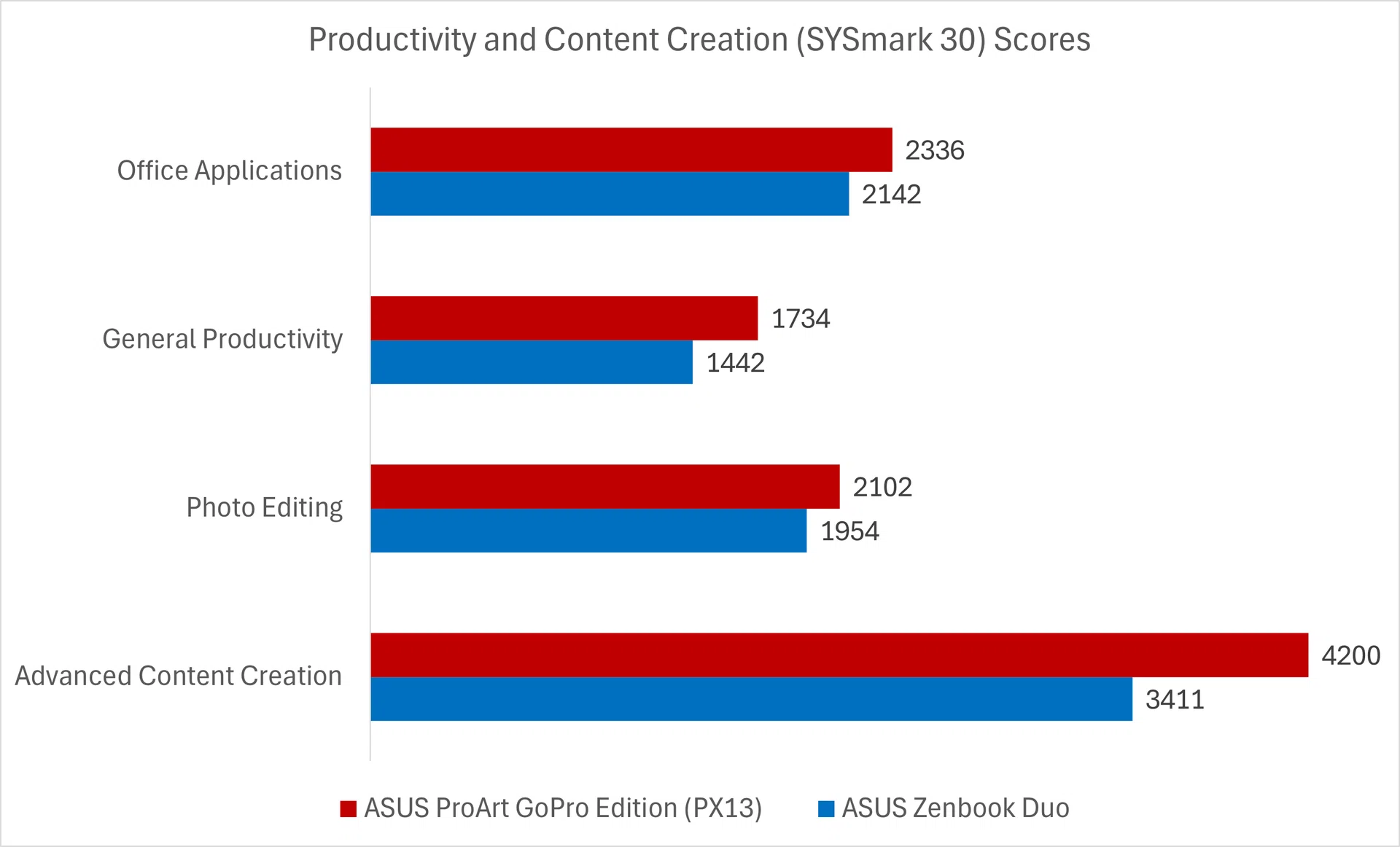
Sysmark 30

Higher is better.

Image: HWZ

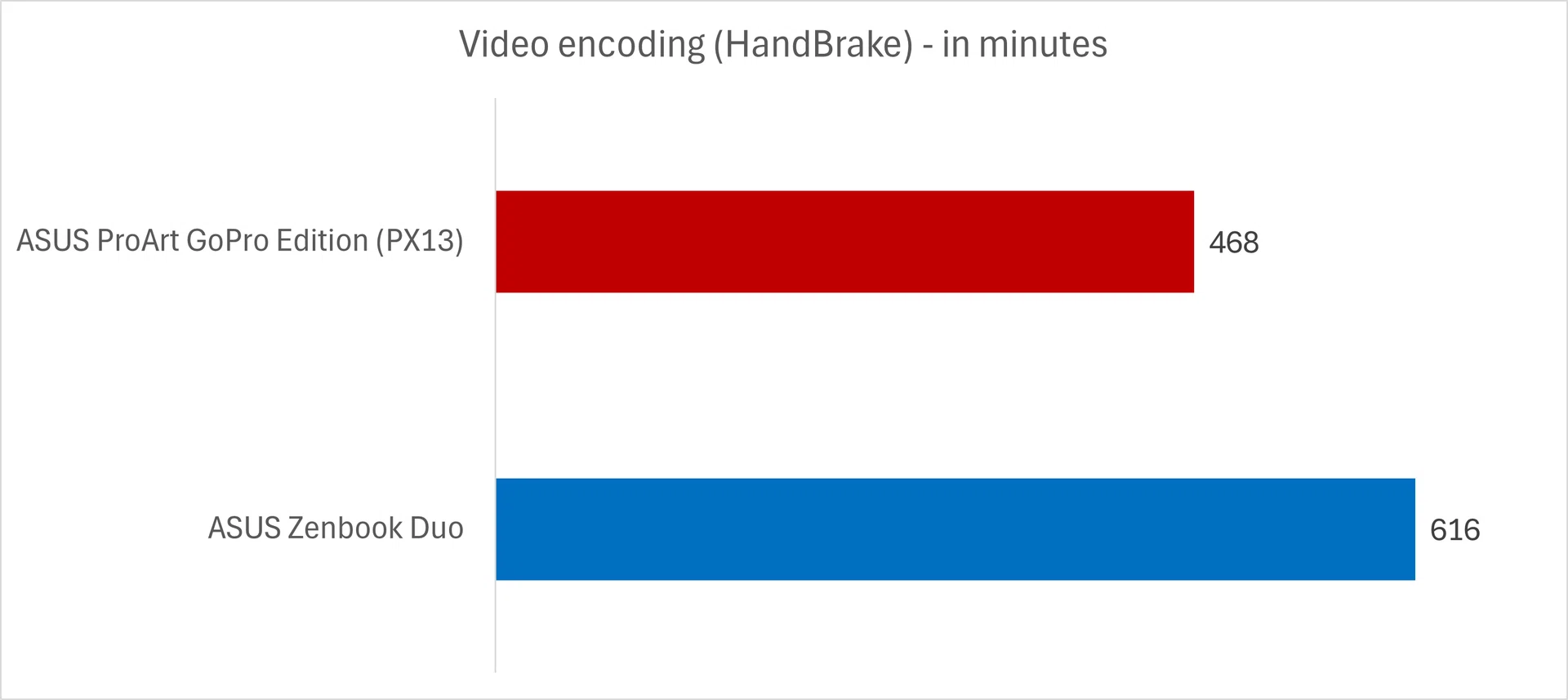
HandBrake

Lower is better.

Image: HWZ

Starting with SYSmark 30, the PX13 pulls ahead across the board, but the gap becomes more obvious once you look at the heavier workloads. Office and general productivity see a modest lead, which is expected, but it’s in content creation where the difference really shows. The Advanced Content Creation score in particular stands out, and that lines up with how the laptop feels in actual use – it’s noticeably more comfortable handling heavier, multi-layered workloads without slowing down. That carries over into the real-world HandBrake test as well, where the PX13 completes the encoding significantly faster than the Zenbook Duo.

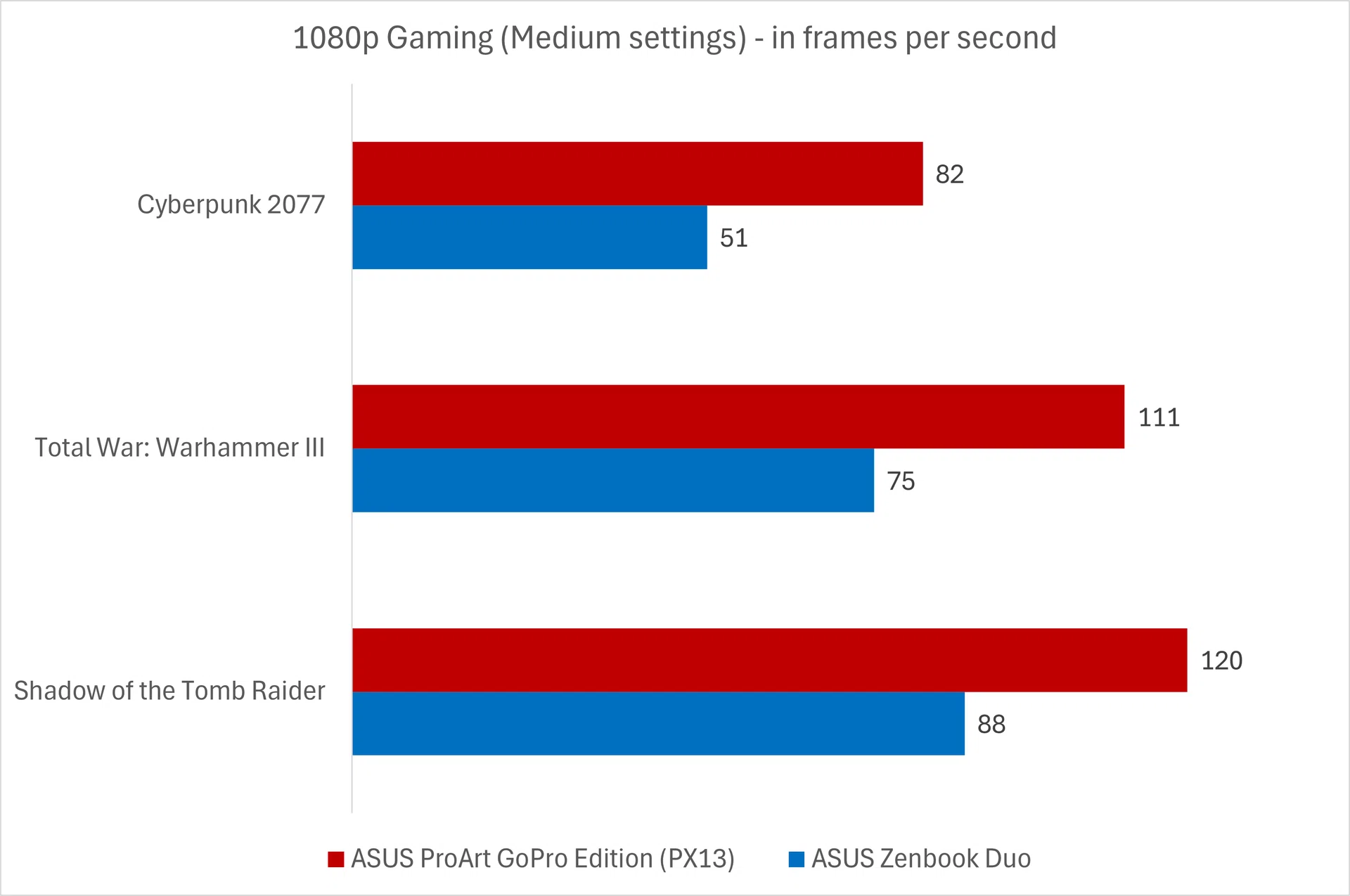
1080p Gaming

Higher is better.

Image: HWZ

Gaming is where the difference becomes the most obvious. Across Cyberpunk 2077, Total War: Warhammer III, and Shadow of the Tomb Raider, the PX13 is consistently ahead, and not by a small margin. The Radeon 8060S iGPU is clearly doing a lot of the heavy lifting here. You wouldn’t normally expect this kind of performance from a 13-inch creator laptop, and while I don’t think anyone is picking this up just to game on it, it does mean the PX13 has quite a fair bit of headroom for some GPU-centric work – such as AI tasks.

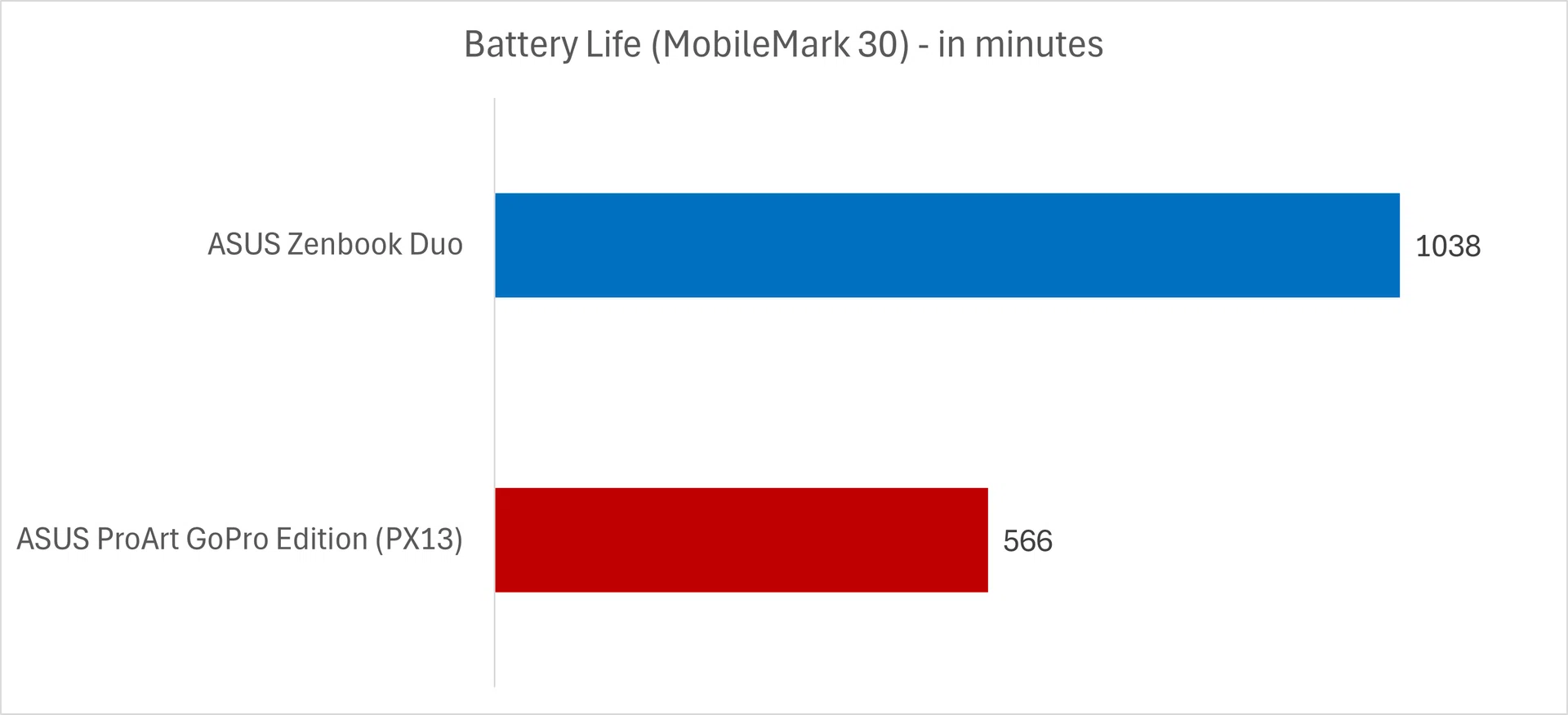
MobileMark 30

Higher is better.

Image: HWZ

Power draw

Lower is better.

Image: HWZ

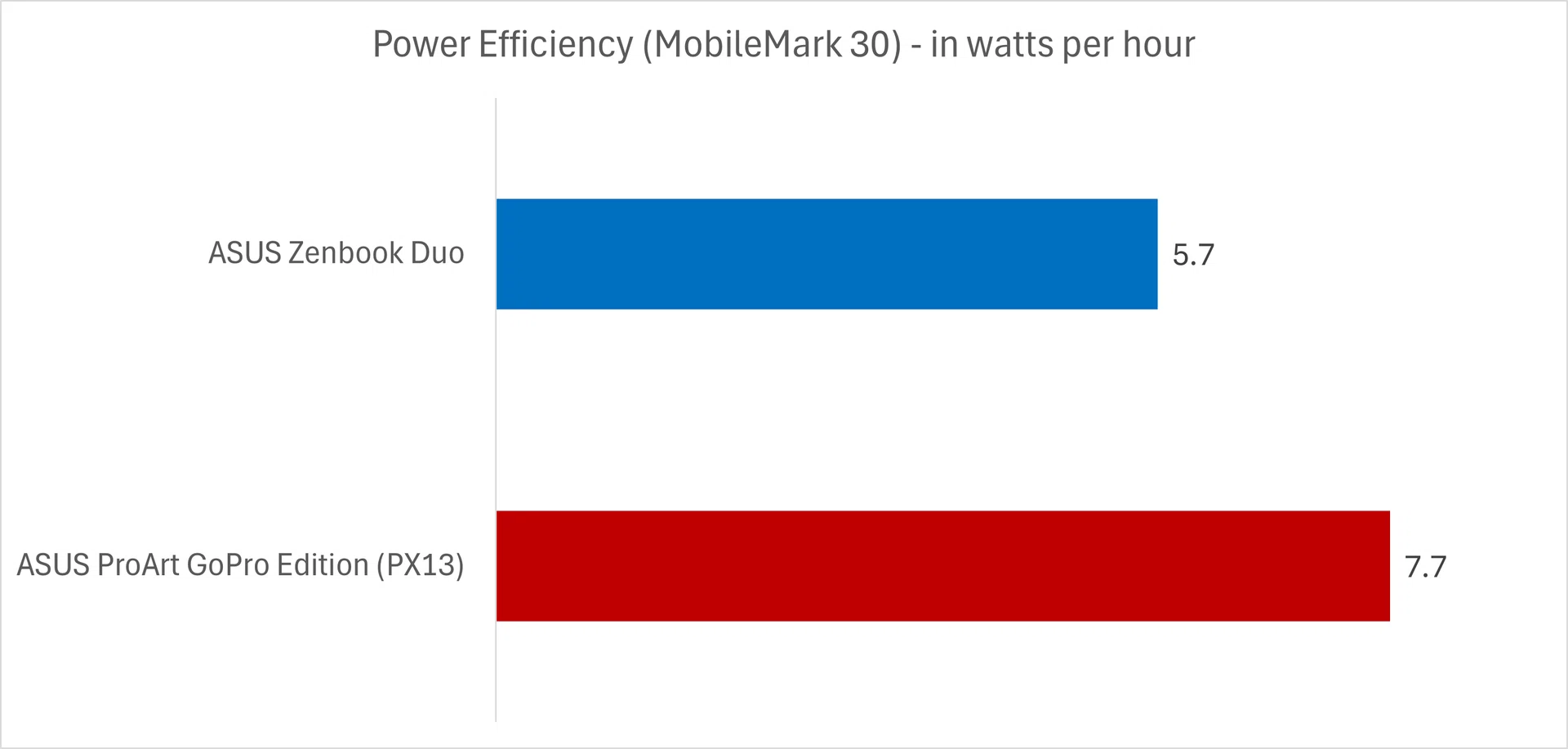
That same performance advantage does come at a cost, and it shows up pretty clearly in the MobileMark 30 results. The PX13 doesn’t last as long as the Zenbook Duo, which isn’t too surprising once you consider how much more it’s doing under the hood. Looking at the power draw, it’s clear the PX13 is simply pulling more power during the test, and that lines up with what you’re getting in return. It’s pushing higher performance more consistently, and that naturally eats into battery life.

Final thoughts

Tent mode

The PX13’s display can be flipped 360-degree in “tent” mode.

Photo: HWZ

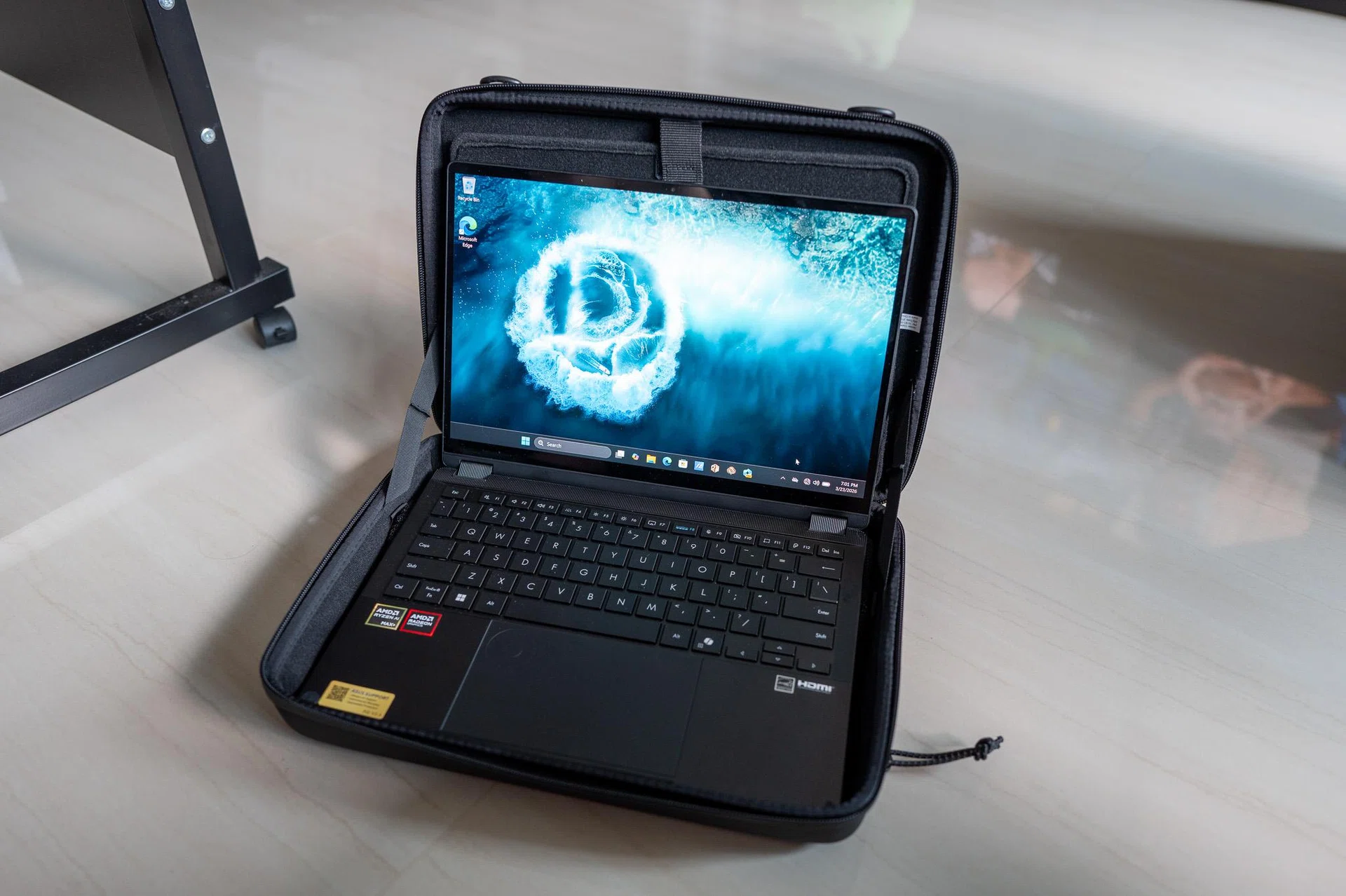
At the end of the day, I don’t think the ProArt GoPro Edition (PX13) is really about GoPro at all. The collaboration adds a layer of integration, but it doesn’t fundamentally change how the laptop works, and despite ASUS’ marketing efforts, there isn’t much here that feels especially essential unless you’re already using GoPro’s workflow – even with extras like the bundled hard-shell case with its bungee cords and straps, which are clearly meant to encourage you to bring it outdoors.

What stands out more is how far ASUS has pushed the hardware in a 13-inch form factor. The PX13 doesn’t behave like a typical ultraportable, definitely not in our benchmarks as shown above. It’s comfortable handling heavier workloads, and it even has enough GPU headroom for more demanding tasks such as AI. The trade-off, as expected, is battery life, but it feels like a conscious one rather than a shortcoming. At $5,599, though, this is firmly in premium territory, and it’s the kind of price that only really makes sense if you know you’ll take advantage of that extra performance.

I think that’s really how I’d look at the PX13. Not as a collaboration machine, but as a compact creator laptop that leans more towards performance than efficiency. It also feels like ASUS trying to stretch the ProArt lineup a bit further, targeting a more specific group of users who want something powerful but still portable. It’s not trying to be the longest-lasting machine you can carry around, but one that lets you get real work done wherever you are. And that probably explains the direction ASUS is taking with it.

The ASUS ProArt GoPro Edition (PX13) is now available at $5,599 at the ASUS Exclusive Store, ASUS Online Store, and all authorised retailers.


Read Full Article At Source