
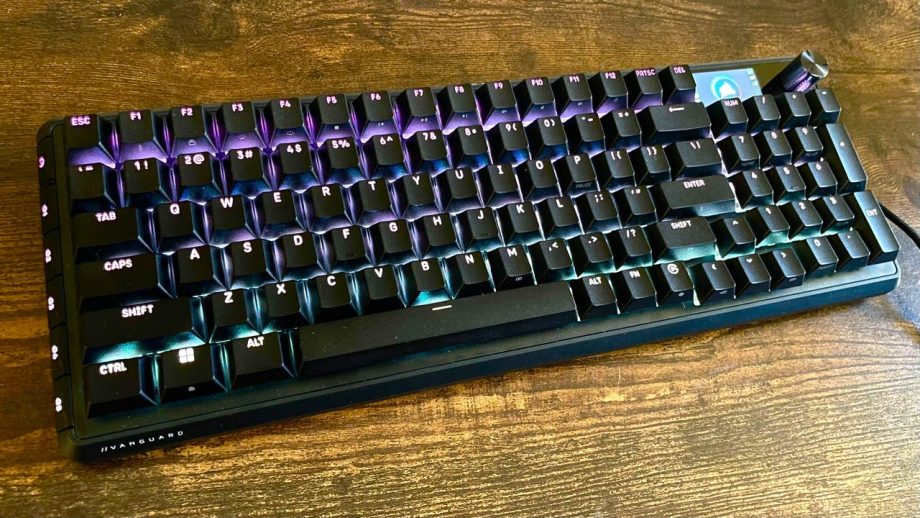
Between the K70, K100, and K55 from years past, Corsair had consistently been in the conversation for top keyboard maker alongside the likes of Razer and SteelSeries (and Keychron, if you ask me). In recent years, though, the aforementioned brands had pulled ahead with their new models, weaving innovations in here and there to keep things fresh. Corsair has now closed that gap and made a statement with the new Vanguard Pro 96. It’s not just because it adopted magnetic switches, but things like the 96% layout, smart macro buttons, and LED display add up to make it a sort of “greatest hits” of the best gaming keyboards. There are a few minor design quirks I’m not a huge fan of, but the Vanguard Pro 96 feels like one of the more complete gaming keyboards I’ve tested, even in the high-end space.
Corsair Vanguard Pro 96 – Design and Features
The Vanguard Pro 96 has the basics locked down with double-shot PBT keycaps, a strong aluminum frame, and vibrant RGB backlighting that shines through the exposed keycaps. The frame flares out a bit which makes for a slightly wider base, and while that’s not necessarily a design flaw, it’s not quite as clean-looking as some of the best keyboards in recent years (though it is tidier than most other Corsair boards). You also get a nice padded wrist rest that attaches magnetically with a little branded flair in the middle.
However, this gives room for the cleverly implemented macro buttons on the left side of the board (designated G1 through G5). The six programmable buttons angle outward of the base, making them easy to see and press in a moment’s notice. Most other keyboards with macro buttons have them as an extra column of keys that adds some unwanted bulk, and thankfully, Corsair figured out a way to bring the functional benefits without the heft.
You’ll notice a bright 1.9-inch LCD screen at the top right of the keyboard next to the textured aluminum rotary dial. It acts as a sort of heads-up display that shows your keyboard’s information and lets you control many of the Vanguard Pro’s settings on the fly. I’ve praised this kind of feature on Razer’s new BlackWidow and the SteelSeries Apex Pro, and Corsair has done something similar on other high-end offerings, but this is a sleek rendition of the idea. I wish that it was more intuitive to navigate the menus on the screen (you have use the FN + F12 to shuffle through the controls), but once you get the hang of it and/or customize its functions via the web software, it’s fairly smooth sailing.
While this isn’t something I can attribute to the Vanguard Pro alone, I’m just really happy that Corsair decided to use the 96% layout – it’s a format I’ve gushed about since getting a Keychron K4 years ago (and subsequently reviewing the K4 HE) because it doesn’t compromise full-size functionality and still saves a decent amount of deskspace. Sure, you lose a dedicated center column, but since I rarely use those controls and can still access them via the keypad, it’s an easy concession to make. And the fact it was still able to slap on a LCD control panel, rotary dial, and macro keys is the kind of design I’ve been looking for.
The last headlining feature is Corsair’s own MGX magnetic switches, which stack up extremely well to their Hall Effect contemporaries. Each keystroke comes with a smooth, linear feel and a consistent resistance curve (from 30g to 55g) throughout its full 4.0mm travel distance. Like any Hall Effect keyboard worth its salt, you can adjust the actuation point anywhere between 0.1mm to 4.0mm, which is one of the main advantages of having magnetic switches. Corsair has only used the MGX switches on two of the top K70 models, and they shine just as bright on the Vanguard Pro.